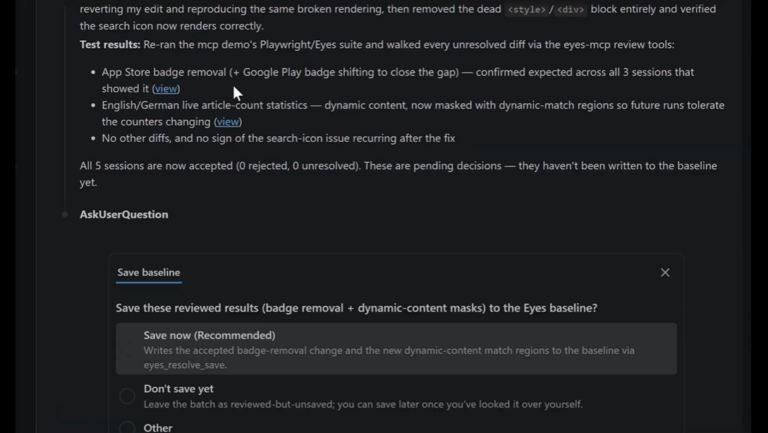

You wrap up your day. Before you leave, you kick off the full test suite. The same one you always run, now with Applitools visual checks throughout. You close your laptop.
While you’re gone, the Applitools MCP server puts your AI agent to work.
It pulls every visual difference flagged during the run. For each one, it compares each page’s structure against the baseline to see exactly which elements moved, appeared, or disappeared, and the stated intent behind the update. It correlates the visual diff against that context. Additional information from tickets closed in sprint, release notes, and the feature descriptions can provide additional clues for better accuracy. A button that moved because a new element was added above it, expected. A nav item that disappeared with no ticket or release notes explaining it, not expected.
The agent ranks the findings by severity. Critical differences that affect functionality surface at the top. Cosmetic changes settle lower and can be already marked for baseline update.
Then it takes action. For differences it can confidently attribute to intentional changes, it accepts them and holds the baseline updates for your approval. For ones that look anomalous, regressions that don’t map to any known change, it flags them, notes why it held off, and leaves them for a human to make the call.
You open your laptop. There’s a report waiting.
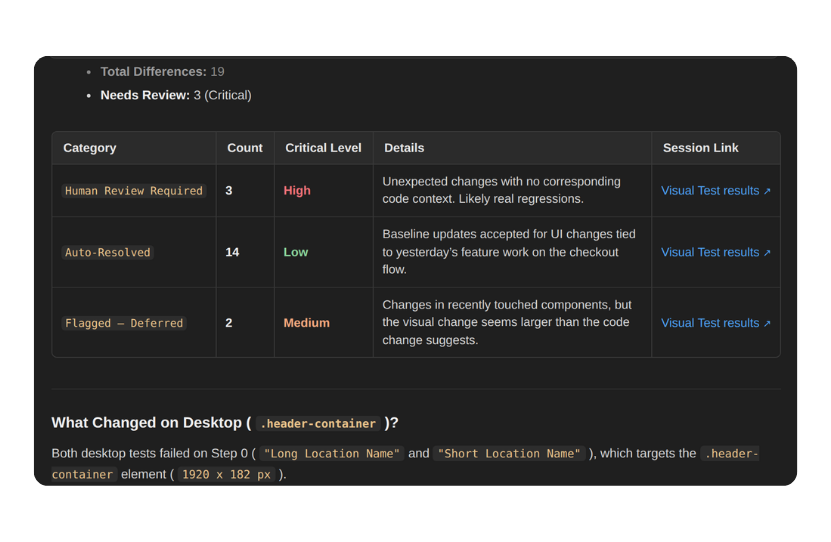
Not a wall of screenshots to click through. A prioritized, plain-language summary:
Everything resolved is documented: what the difference was, which feature it was tied to, and the reasoning behind accepting it. You have a full audit trail, not just an outcome.
You spend fifteen minutes reviewing the three critical items. Two turn out to be real bugs. One is an edge case. And because you chose to keep a person in the loop, none of it is final until you say so. The agent staged the baseline updates. You approved them. Until then, nothing had changed. You’re done before your first meeting.
This isn’t a contrived demo scenario. It’s the answer to a very real pain point that teams running visual tests know well. And AI coding agents make this worse. More code per day means more intentional UI changes per release, and a release backlog that grows faster than any team can clear it.
Visual testing is worth doing precisely because the UI is where users live. But the more valuable your visual coverage, the more results you have to manage. Every intentional UI change, a redesign, a new component, a copy tweak, generates failures that someone has to process. Not because something broke, but because the world changed and the baseline hasn’t caught up yet.
Teams that don’t keep up with baseline maintenance end up with one of two failure modes: they start ignoring failures (“that’s probably fine”), or they disable checks entirely. Either way, the visual coverage they invested in quietly stops working.
The core problem isn’t the tool. It’s that reviewing and triaging test results requires context/knowledge of what changed, why it changed, and whether the visual difference reflects the intent. That’s exactly the kind of cross-referencing that AI is good at. And it’s exactly what Applitools MCP enables.
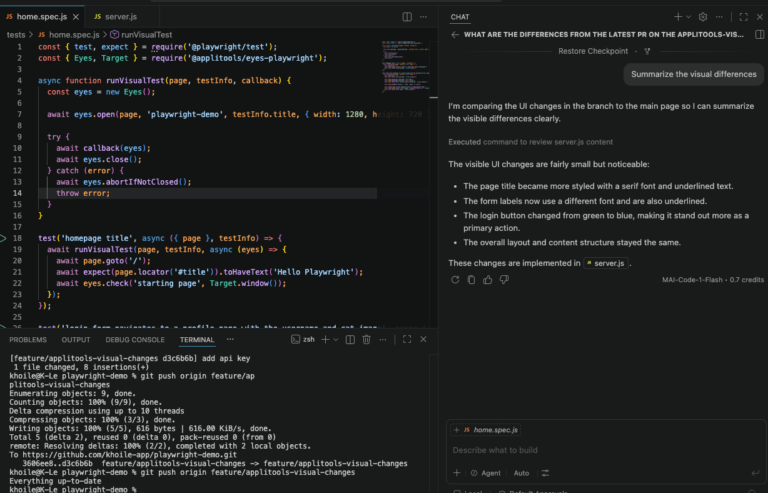
Applitools MCP (@applitools/mcp) exposes Applitools’ visual testing services as tools that your AI agent, whether that’s Claude Code, Cursor, Copilot, or Cline, can call directly. The agent can now “see” what changed in the app itself. It doesn’t just read results. It operates the platform from the way an expert review would: inspecting each visual difference, using page structure snapshots to pinpoint which elements moved and why the layout shifted, and managing the process of accepting or rejecting changes, including masking dynamic portions known to change.
Learn more about our approach to visual testing for AI coding assistants.
The key insight isn’t that tests ran while you slept. CI has done that for years. The real breakthrough is that the results were acted on. The gap between “tests finished” and “results are actionable” collapses. The maintenance that used to accumulate, outdated baselines, a growing backlog of unreviewed diffs, the slow erosion of test signal into noise, gets handled continuously, as part of the run.
There’s a reasonable objection to any AI-driven workflow: how do you know it got it right?
It’s a fair concern. LLMs are probabilistic by nature. They summarize, infer, and sometimes fill gaps with confident-sounding guesses. In most contexts that’s a manageable tradeoff. In test reporting, it isn’t. If your test suite has 5 failures and your morning report says 4, you’ve already lost the point.
See how Applitools bridges the probabilistic validation gap in agentic SDLCs using deterministic Visual AI.
The first answer is that the LLM isn’t the one deciding what changed. Every visual difference is found by Applitools’ deterministic Visual AI, not a language model. The same screen produces the same result every time, with no statistical guesswork, no phantom failures, and few tokens spent re-analyzing screenshots on every run. The agent starts from findings that are already reliable.
The second answer covers what the agent says about those findings. Applitools MCP solves this with a built-in verification layer that sits between the data and the AI’s response. Before any summary reaches you, the gate checks that what the agent is about to say matches the actual results on record. The count has to match. The outcomes have to match. If there’s any discrepancy, the response doesn’t go through.
In practice, this means the AI cannot hallucinate your test results. The language can be natural and the analysis contextual, but the facts are locked to ground truth.
This is what makes autonomous test maintenance trustworthy enough to act on. You’re not reading an AI’s interpretation of your results and hoping it got the details right. You’re reading an AI’s analysis of results that have already been verified. The judgment layer sits on top of accurate data, not instead of it.
Test maintenance has always been the tax that made teams question whether visual testing was worth it. The coverage is valuable. The upkeep is painful, and AI generated code makes it heavier with every release. MCP tips that equation.
When an AI agent can look at your visual differences with planned work, baseline history, page structure and make confident decisions about what’s expected and what isn’t, the nature of the work changes. Human reviewers focus on genuine ambiguity. Everything else gets handled.
Watch CTO Adam Carmi demo this deterministic agentic workflow with Applitools MCP.
That changes what a small team can own. Broad visual coverage of AI-generated software stops being a headcount problem. And because Visual AI catches the regressions nobody anticipated, your agents are held to the same standard your users see.
You still own the test suite. You still make the final call on anything uncertain. But the starting point each morning isn’t a backlog. It’s a brief.
Ready to get started? Check out our Applitools MCP documentation and set up your agent today.