Give Your Optimizely Devs (and Agents) Visual Guardrails to Prevent Bugs. Save your spot for the Oct. 29th webinar

Give Your Optimizely Devs (and Agents) Visual Guardrails to Prevent Bugs. Save your spot for the Oct. 29th webinar
Some of the most important things software produces never show up in a browser. They reach the customer as a document instead: a bank statement, an insurance policy, a device label, an invoice. Image Tester has been testing documents like these for years. What is new is that the people who know those documents best can finally test them too.
The tricky part is that functional testing is built to catch failures, and a broken document usually does not fail in any way a test can notice. The file gets generated, the data is right, and the build comes back green, so every signal says the run succeeded. The rendered page can still be wrong. A statement gets cut off at the page break, a logo quietly fails to load, or the wording of a required disclosure shifts the last time someone edits a template. Because nothing actually errored out, nothing gets flagged.
In banking, insurance, and healthcare, that kind of gap is more than cosmetic. A wrong figure or a missing disclosure on a document a customer sees can turn into a real compliance problem, and it costs a lot less to catch before the document goes out than after. This is what Image Tester was built for. It takes your images, PDFs, and Microsoft Office files, whether that is Word, Excel, PowerPoint, or plain text, renders them, and compares each page against a baseline stored in Applitools Eyes. If anything changes visually, even a shifted line or a dropped character, it gets surfaced so a person can take a look.
This is not a niche capability, either. Over the past thirty days Image Tester ran more than 116,000 test sessions, most of them PDF comparisons, and it sees the heaviest use in exactly the industries where a document error costs the most. For all that reach, though, one thing held it back. You had to use a terminal to run it, and that quietly shut out many of the people who needed it most.
Image Tester helps you catch compliance issues before a bad statement, policy, or label ever reaches a customer or a regulator
For an engineer, a command-line tool is perfect. Image Tester runs headless in CI, picks up batch IDs from environment variables, and works out batch names, test names, and recursively steps through your folders. Point it at a directory tree and Image Tester handles the rest.
The people who care most about whether a document is right, though, are usually not engineers. At one large financial institution, the team that owned compliance documentation was made up of compliance and operations specialists. Nobody understood those documents better. What they did not have was any comfort with a terminal, and just getting to a first test meant installing a Java runtime environment, downloading a JAR file, setting environment variables, and learning the execution syntax. Onboarding calls kept turning into command-line tutorials, and most of those people never made it to their first result. We heard some version of this from enough customers that the takeaway was hard to argue with.
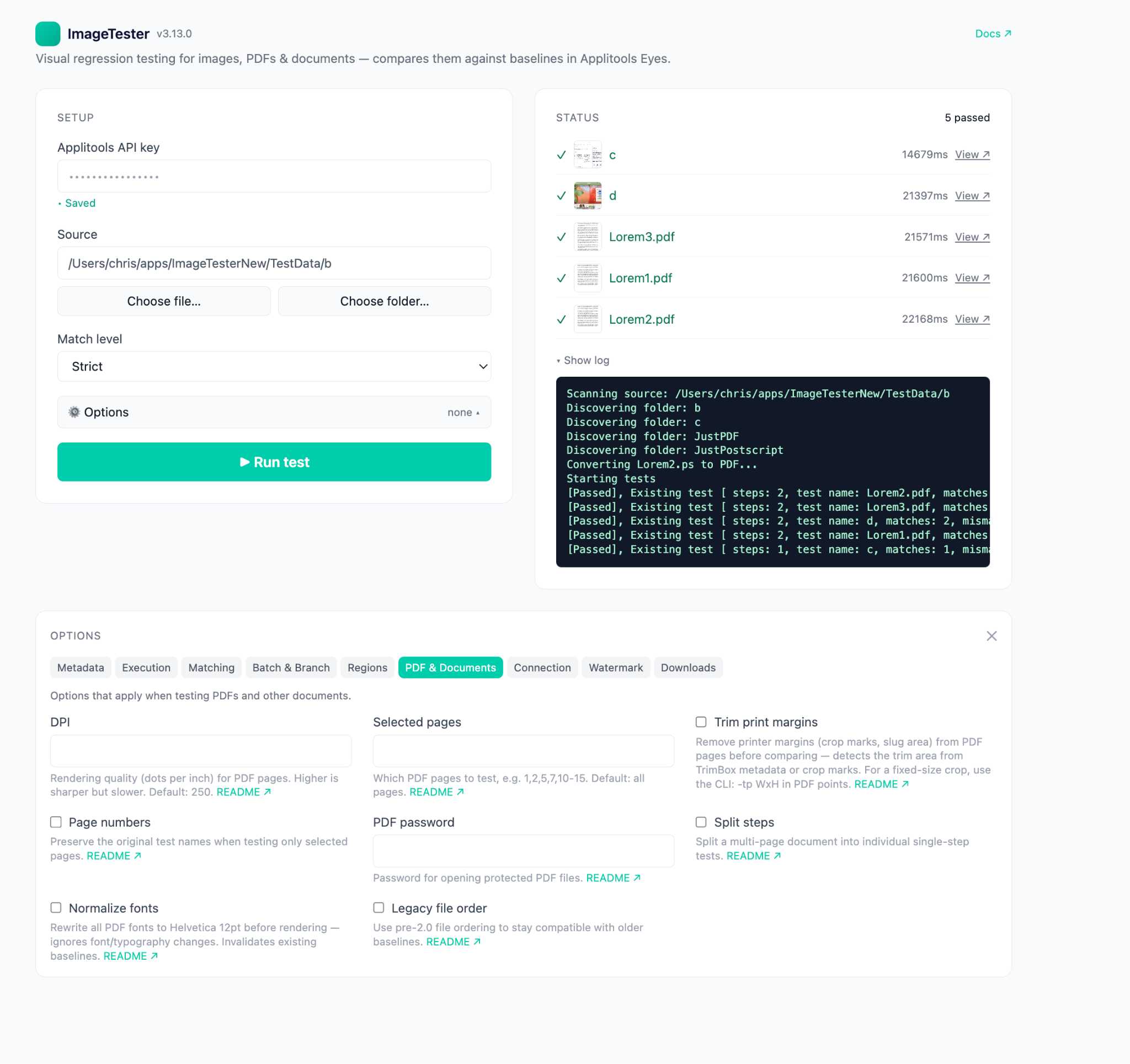
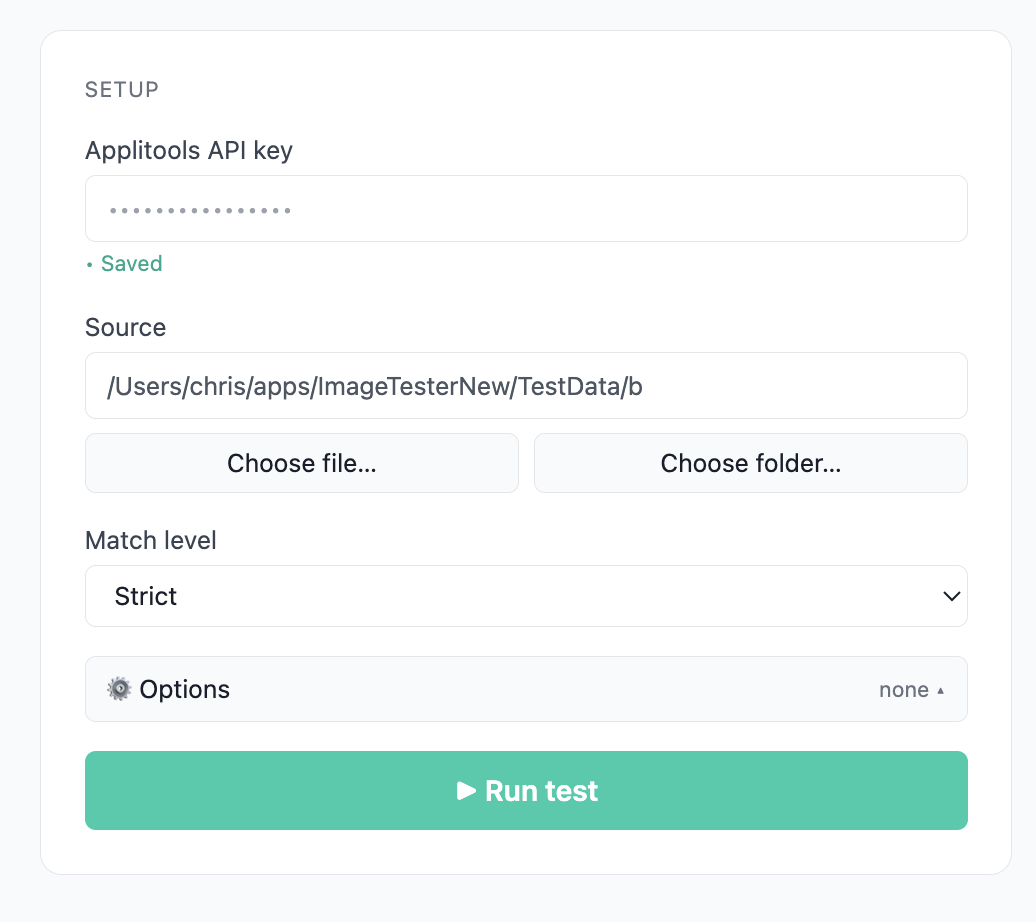
The new Image Tester is a proper desktop app, built around a single screen. You paste in your Applitools API key, and it persists across sessions. You choose a file or a folder, pick a match level, and hit Run test. That really is the whole setup. The entire setup takes less than a minute.
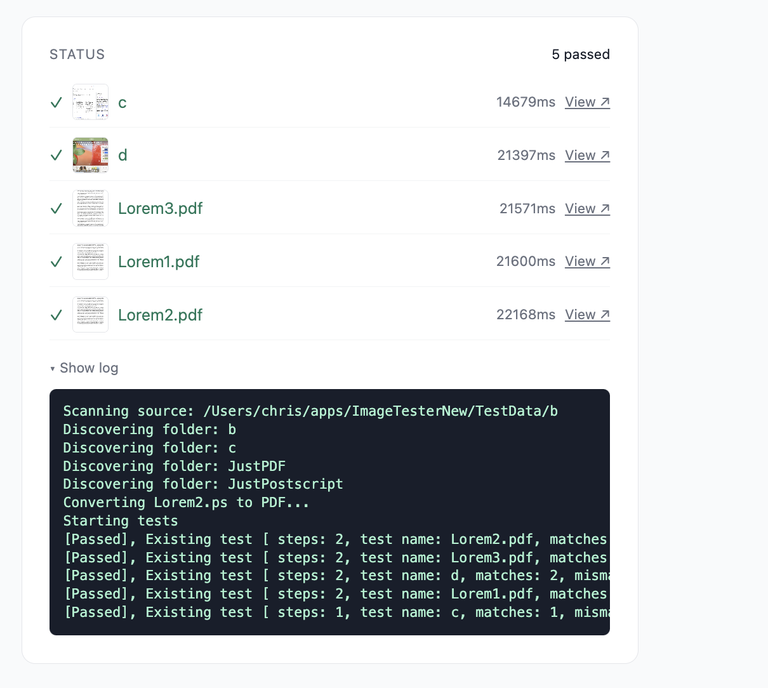
As the tests run, the results come in one by one: pass or fail for each file, how long it took, and logs that reveal what’s happening underneath. Each result links straight through to the Applitools Eyes dashboard, where the differences are highlighted and anyone on the team can review them and accept or reject each change.
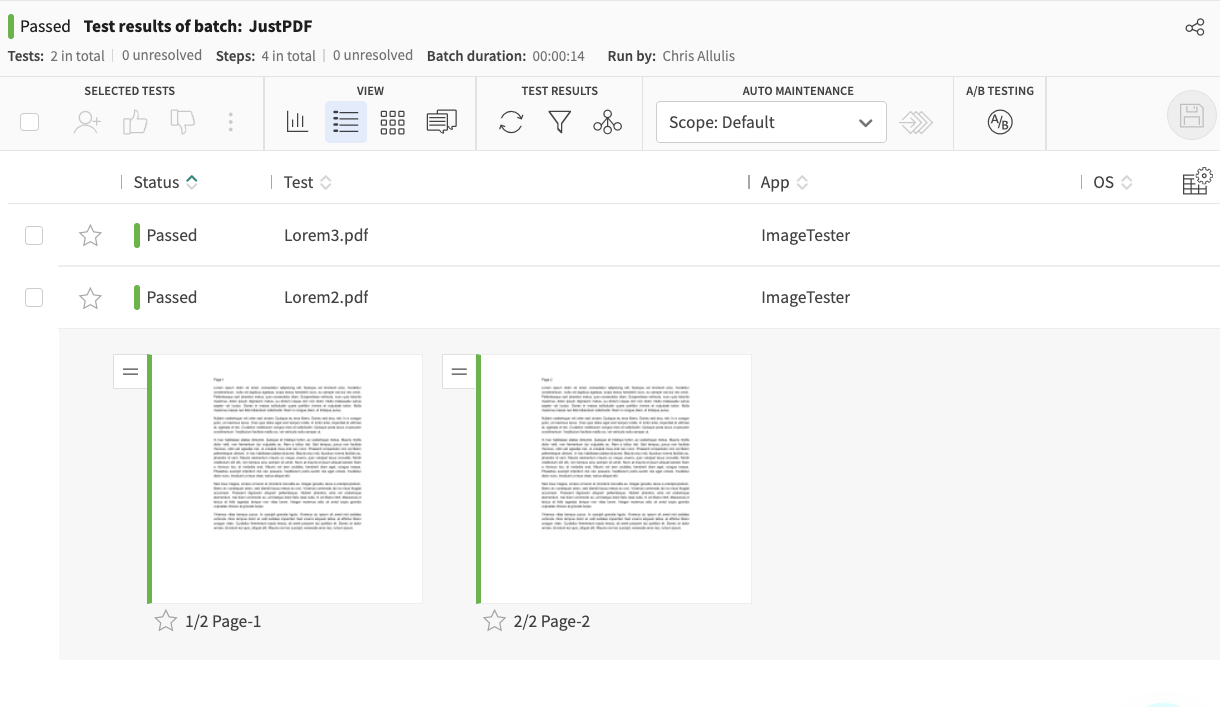
For a compliance analyst checking this quarter’s statement templates, that is the entire job, beginning to end, with no terminal anywhere in it.
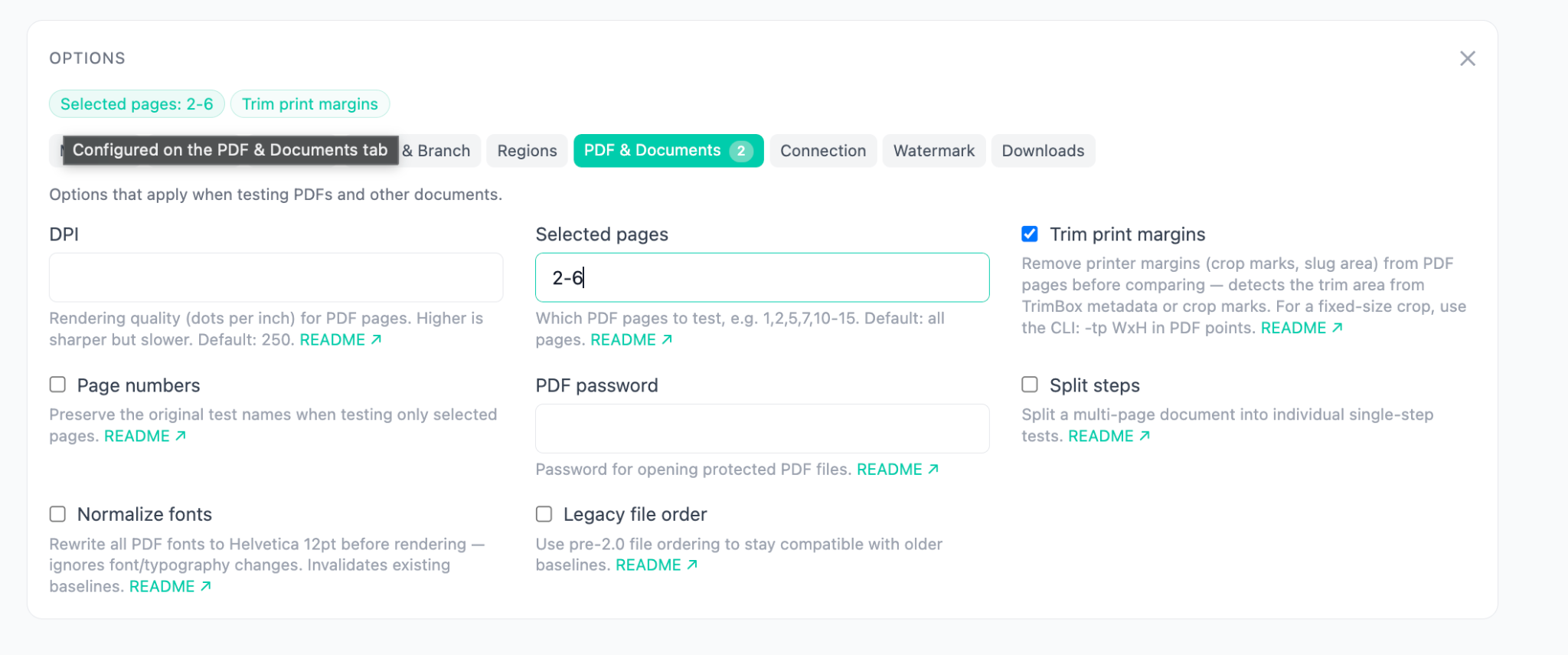
Ease of use didn’t come at the cost of capability. The app has full parity with the CLI—everything the command line can do, the app can do. It’s all in the Options panel, grouped into tabs: execution settings like thread count and logging, matching options, batch and branch organization, regions, PDF settings, proxy and server configuration, and downloads of failed-step images.
The PDF and Documents tab is a good example of the thinking. Rendering DPI, choosing specific pages, opening password-protected files, trimming print margins, splitting a multi-page document into separate tests, normalizing fonts for text-only testing: in the CLI, each of those is a flag you would have to go and look up. In the app, each one is a labeled field with a plain sentence telling you what it does and when you would want it. Nothing is hidden away, and nothing assumes you already know the syntax.
The real shift here is not about convenience. It is about access. For a long time, testing a document depended on someone being comfortable at a command line, while the people who actually understood the documents were often the ones who could not run the check. The app closes that distance, and the know-how and the tool finally sit with the same person. That is what it means to democratize this kind of testing.
The payoff shows up first in speed. What used to mean filing a ticket, waiting for engineering to have time, and reading the results secondhand now takes a reviewer a few minutes on their own schedule, looking at the differences directly. Coverage grows at the same time, because more documents can be checked, more often, by more people, without pulling engineers off other work. If your team puts out hundreds of customer-facing documents a quarter, that is the difference between spot-checking a few and reviewing all of them.
And because the app and the CLI work from the same baselines and the same dashboard, opening this up to more reviewers does not splinter the process. Everyone is comparing against the same source of truth, and a decision made in one place carries everywhere. Problems get caught earlier and you are less exposed, because a rendering defect is spotted close to when it appears, before a bad statement, policy, or label ever reaches a customer or a regulator. When a single wrong document can trigger a finding or chip away at trust you have worked hard to earn, catching it sooner is the whole point.
The GUI is the headline, but this release also adds new capabilities to the engine underneath, available in the app and the CLI alike.
Automatic watermark removal. Watermarks (e.g., DRAFT stamps, confidentiality overlays, generator marks) used to show up as diffs even when the document content was identical. Image Tester can now detect and remove them before comparison, so a watermark change doesn’t fail every page.
Font normalization. Documents get re-rendered in a single normalized font before comparison, so a font-library upgrade or a small typography change doesn’t break your baselines. If content is your primary concern—the numbers, the wording, the layout—this filters out the noise and leaves the diffs that matter.
Multithreaded rendering. Long PDFs now render across multiple threads, cutting processing time by about 60% on average. A few-hundred-page statement run that used to be a coffee break is now a scroll through the results.
None of this means the CLI is going away. It is fully supported, and for CI and CD it is still the right tool for the job. If your team runs PDF tests in a CI environment, then the CLI is the right tool for the job. One line in the pipeline java -jar ImageTester.jar -k [api-key] -f [path] runs headless against a single file or an entire folder tree, and adding the -te flag makes Image Tester throw an exception on any visual mismatch, so a rendering defect optionally fails the build.
The CLI is also built to be pipeline-aware. It picks up APPLITOOLS_BATCH_ID and JOB_NAME from environment variables, so every document tested in a CI run lands in one batch tied to that job on the dashboard. Point Image Tester at a directory and it recursively derives batch names, test names, and steps from the folder structure, with no per-file configuration. And when a document’s composition changes over time, say two new pages are added to the front of a statement, the Batch Mapper can drive tests from a CSV instead, specifying pages, match levels, and regions per file.
The setup we expect most teams to land on is both at once: engineering wires Image Tester into the document-generation pipeline so every generated PDF is checked automatically, and the document owners use the app for quick checks and baseline review. Same tool with slightly different use-cases.
Image Tester is on GitHub, and all you need to run it is an Applitools API key. Getting from download to your first result takes a few minutes: point it at a PDF, click Run Test, and look over the outcome in the dashboard. If your team produces documents where a rendering mistake carries real consequences, those few minutes are well spent. Simply follow the instructions on the release page, and you’ll be able to test PDFs, Office documents, and more!
The bottom line is simple. Testing the documents your customers see is no longer only an engineering job. Now the people who create and own those documents can test them too.
Image Tester supports images, PDFs, and Microsoft Office documents (Word, Excel, PowerPoint, and text files), including multi-page files, password-protected PDFs, and full folder structures. More detail in the README.