Give Your Optimizely Devs (and Agents) Visual Guardrails to Prevent Bugs. Save your spot for the Oct. 29th webinar

Give Your Optimizely Devs (and Agents) Visual Guardrails to Prevent Bugs. Save your spot for the Oct. 29th webinar
Automated testing is only as valuable as the speed at which its results reach the people who can act on them. A test suite can be fast, thorough, and perfectly maintained, but if nobody sees the outcome until hours later, most of that value quietly evaporates.
On many teams, this is exactly what happens. Tests run in the background on a schedule or as part of a pipeline, and the results sit in a dashboard waiting to be noticed. Someone has to remember to go look. That delay creates a gap between the moment a test finishes and the moment the team actually knows about it, and it is inside that gap that problems compound. A broken build stays broken a little longer. A regression that could have been caught in minutes gets discovered after it has already blocked someone else. Small delays stack up into stalled momentum.
The cost is rarely dramatic in any single instance, which is part of what makes it so easy to overlook. It shows up instead as a steady drag: engineers context-switching to check on runs, results reviewed in batches rather than as they happen, and the occasional failure that slips through simply because no one was watching the dashboard at the right time.
To close that loop, our team built an integration that posts a notification to your team’s Webex space within moments of an Applitools Autonomous test completing. There is no dashboard to check and no waiting to find out how a run went. The moment your results are ready, your team hears about it.
The idea is deliberately simple. When a test run on Applitools Autonomous completes, the right people receive an immediate, cleanly formatted message in their Webex space. Notifications typically arrive within a minute of execution, giving your team a near real-time signal they can act on straight away.
That small shift changes the dynamic entirely. Test completion stops being something you go looking for and becomes something that finds you. Instead of a team member periodically opening a dashboard to check whether the latest run passed, the result arrives where the conversation is already happening. The people who need to know are notified together, at the same moment, with enough context to decide what to do next.
Because the message is formatted for humans rather than machines, there is no parsing raw output or clicking through several screens to understand what happened. The notification tells the team what ran, how it turned out, and where to go for detail, all in a form that reads naturally in a chat space.
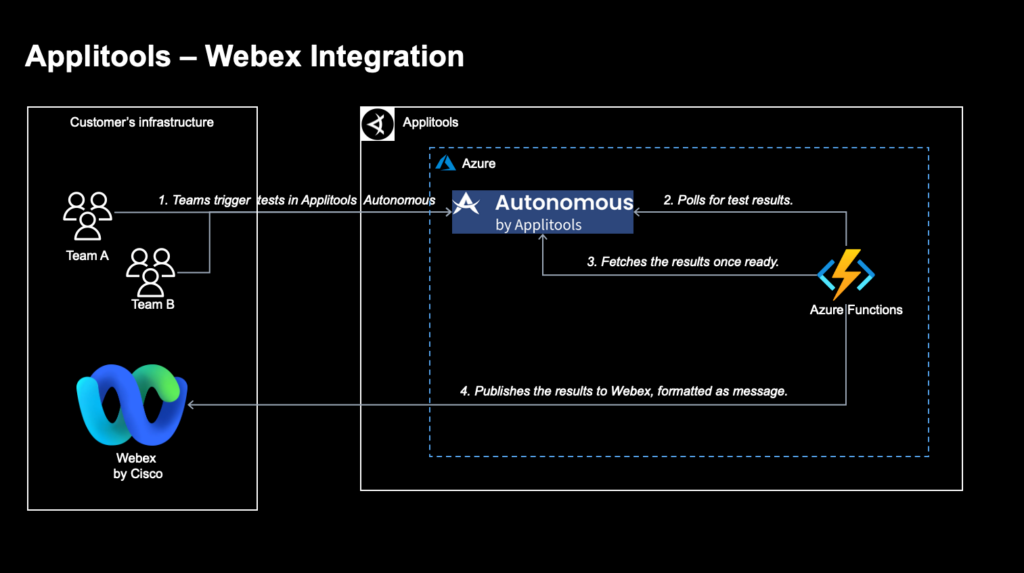
The integration rests on two core components that work together as one lightweight pipeline.
Azure Functions provide the serverless backbone. Rather than running a dedicated server that sits idle most of the day waiting for something to happen, the logic wakes on a schedule, checks for completed tests, and finishes its work in seconds. This model has two practical advantages. First, it is cost-efficient, because you are not paying to keep a machine running around the clock for a task that only needs a few seconds of attention at a time. Second, it scales on its own. Azure Functions consume resources only when there is something to report, which makes them a natural fit for an event-notification workflow like this one, whether a team runs a handful of tests a day or many times that.
Applitools Autonomous APIs supply the test data. By connecting directly to the Autonomous platform, the integration retrieves test status and results programmatically. This is what keeps the notification accurate and trustworthy: the message reflects the real outcome of the run as reported by the platform itself, not a secondhand copy that can drift out of sync. Once the data is retrieved, the integration transforms it into a clear, human-readable message ready for delivery.
Together, the two pieces form a single, dependable flow. On each cycle, the Azure Function checks the Autonomous APIs for tests that have finished, formats the outcome of any it finds, and delivers the message to the target Webex space, all within about a minute of the run completing. There are no manual steps in between, and nothing for a person to trigger or remember.
Faster reaction time. When results reach your team in under a minute, issues get triaged sooner and fixes ship faster. A failure that surfaces immediately is far cheaper to address than one that sits unnoticed while work continues on top of it. The feedback loop tightens exactly where it counts.
Less context switching. Your team already lives in Webex. Bringing results into the tools people use every day means fewer tabs, fewer dashboards, and less friction between seeing a problem and acting on it. Engineers stay focused on their work instead of interrupting themselves to go check whether a run has finished.
Shared awareness. Because the notification lands in a shared space rather than a private inbox, the whole team gains visibility at the same moment. There is no single person responsible for relaying results, and no risk of an outcome being seen by one person and forgotten before anyone else hears about it.
Lightweight and maintainable. A serverless design means there is no infrastructure to babysit. There are no servers to patch, scale, or monitor for uptime. The integration stays quiet until it is needed, does its job, and steps aside, which keeps the ongoing maintenance burden close to zero.
A foundation to build on. Once results flow into your team’s space automatically, the pattern becomes easy to extend. You can enrich the message with more detail about what passed and what failed, route notifications to different spaces depending on the result or the team that owns it, or use a completed run as the trigger for downstream automation. What begins as a simple notification can grow into a broader signal that connects testing to the rest of your workflow.
Good tooling removes the small frictions that quietly slow teams down, and this integration does exactly that. It takes a result that used to require someone to go and check for it, and delivers it proactively, in the place your team already works, within a minute of it becoming available. The change is modest in scope but meaningful in practice, because it removes a recurring point of friction that most teams have simply learned to live with.
The broader principle applies well beyond this one integration. Automated testing tells you what happened. A good notification pipeline makes sure the right people hear about it in time for it to matter. When those two things come together, testing stops being a report you have to remember to read and becomes a live signal your team can genuinely rely on.