Give Your Optimizely Devs (and Agents) Visual Guardrails to Prevent Bugs. Save your spot for the Oct. 29th webinar

Give Your Optimizely Devs (and Agents) Visual Guardrails to Prevent Bugs. Save your spot for the Oct. 29th webinar
In this detailed guide, learn everything you need to know about what regression testing is, along with best practices and examples. Learn how you can apply regression testing in your own organization and much more.
While regression testing is practiced in almost every organization, each team may have its own procedures and approaches. This article is a starter kit for organizations seeking a solid start to their regression testing strategy. It also assists teams in delving deeper into the missing links in their current regression testing technique in order to evolve their test strategy.
Regression testing is a type of software testing that verifies an application continues to work as intended after any code revisions, updates, or optimizations. As the application continues to evolve by adding new features, the team must perform regression testing to evaluate that the existing features work as expected and that there are no bugs introduced with the new feature(s).
In this post, we will discuss various techniques for Regression Testing, and which to use depending on your team’s way of working.
However, before we jump onto the how part, let us understand why having a regression test suite is essential.
A software application gets directly modified due to new enhancements (functional, performance or even improved security), tweaks or changes to existing features, bug fixes, and updates. It is also indirectly affected by the third-party services it consumes to provide features through its interface.
Changes in the application’s source code, both planned and unintended, demand verification. Additionally, the impact of modifications to external services used by the application should be verified.
Teams must ensure that the modified component of the application functions as expected and that the change had no adverse effect on the other sections of the application.
A comprehensive regression testing technique aids the team in identifying regression issues, which are subsequently corrected and retested to ensure that the original faults are not present.
Let us quickly understand with the help of an example – Login functionality.
People commonly use the terms smoke, sanity, and regression interchangeably in testing, which is misleading. These terms differ not only in terms of the application’s scope, but also in terms of when they are carried out.
Smoke testing is done at the outset of a fresh build. The main goal is to see if the build is good enough to start testing. Some examples include being able to launch the site by simply hitting in the URL, or being able to run the app after installing a new executable.
Sanity testing is surface level testing on newly deployed environments. For instance, the features are broadly tested on staging environments before passing it on to User Acceptance Testing. Another example could be verifying that the fonts have correctly loaded on the web page, expected components are interactive and overall things appear to be in order without a detailed investigation.
Regression testing has more depth where the potentially impacted areas are thoroughly tested on the environment where new changes have been introduced.
Existing stable features are rigorously tested on a regular basis to ensure their accuracy in the face of purposeful and unintended changes.
The techniques can be grouped into the following categories:
As the name suggests, partial regression testing is an approach where a subset of the entire regression suite is selected and executed as part of regression testing.
This subset selection results from a combination of several logical criteria as follows:
Partial regression testing works excellently when the team successfully identifies the impacted areas and the corresponding test cases through proven ways like the Requirement Traceability Matrix (RTM henceforth) or any other form of metadata approved by the team.
The following situations are more conducive to partial regression testing:
While this method is effective, it is possible to overlook issues if:
In many cases, reasons like significant software updates, changes to the tech stack demand the team to perform comprehensive regression testing to uncover new problems or problems introduced due to the changes.
In this approach, the whole test suite is run to uncover issues every time new code is committed, or, at some agreed time intervals.
This is a significantly time-consuming approach compared to the other techniques and should ideally be adopted only when the situation demands.
To keep the feedback cycle faster, one must embrace automated testing to enable productive complete regression testing in their teams.
Irrespective of the technique adopted, I always suggest that teams prioritize the most business-critical cases and the common use cases performed by end-users when it comes to execution.
Remember, the main goal of regression testing is to ensure that the end-user is not impacted due to an unavailable/incorrect feature, which could affect business outcomes in many ways.
To achieve better testing coverage of your application, plan your regression testing with a combination of technology and business scenarios. Apply the practices across the Test Pyramid.
Arranging the information in the form of a matrix enables the team to quickly identify the potentially impacted areas.
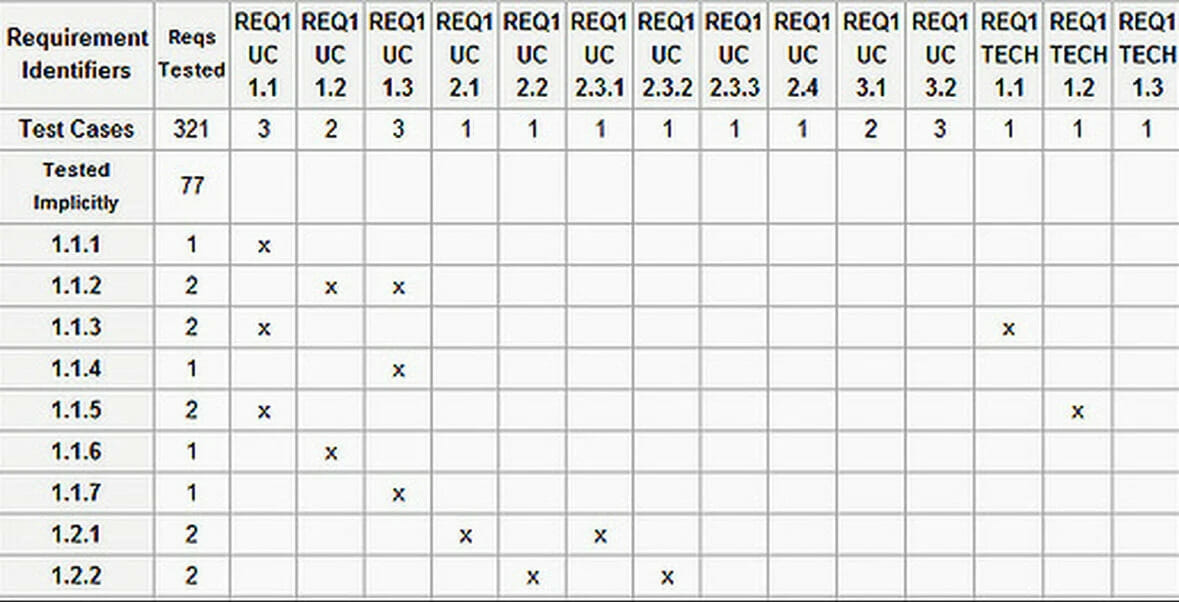
Alternatively, many test case management tools now have started providing inbuilt support to build a regression test suite with the help of appropriate tags and modules. These tools also let you systematically track and identify patterns in the regression test execution to dig into more related areas.
I have seen teams being most effective when they have automated most of their regression suite, and the non-automatable tests organised and represented in a meaningful way that allows quick filtering and meaningful information.
We should leverage the power of automation to create test data instantly across different test environments. We need to ascertain that the updated feature is evaluated against both old and new data.
Ex: A new field added to a user profile, for example, should work consistently for both existing and newly formed accounts.
Production test data plays a vital role in identifying issues that might have been missed during the initial delivery.
In cases where possible, replicate the production environment to identify edge cases and add those scenarios to the regression test suite.
Using production data isn’t always viable, and it can lead to non-compliance issues. Teams frequently conceal / mask sensitive information from production data and use the information to fulfil the requirement for on-the-ground scenario analysis.
If you have multiple environments, we should verify that the application works as intended in each of the environments.
Every time a new person joined the team when the development was already in progress, they asked meaningful questions about the long-forgotten stable features. I also prefer young guns to be part of my regression team to get a raw and holistic testing perspective.
Automate the regression test suite! If you have the budget, great, or else, create supporting mechanisms to utilise the team’s idle time to implement automated tests.
Simply automating the business-critical scenarios or the most used workflows is a good enough start. Initiate this activity and work incrementally.
Either tag/annotate your automated scenarios as per the feature or segregate them into appropriate folders so that you’d be able to run particular automated regression scenarios.
Sequential execution won’t scale with a rising number of test environments and permutations, despite the fact that automated test execution is faster. As a result, concurrent test execution in various settings is required to meet scalability requirements. Selenium Grid and other cloud solutions like Applitools Ultrafast Test Cloud enable you to execute automated tests in parallel across different configurations.
In addition to adhering to best practises when creating the test automation framework, these tests must run at a high pace and in parallel to provide faster feedback.
Always! One cannot ignore the business limitations and the client demands to meet the delivery. Based on your context, adopt the most suitable regression testing techniques.
I have seen it take a long time to automate a regression backlog. To keep making progress on this activity, while estimating the Sprint tasks, always account for regression testing efforts explicitly, or you might be increasing your technical debt in the form of uncovered bugs.
Changes are not always directly related to client needs, nor are they always conveyed. Internally, the development team continually optimises the code for reusability, performance, and other factors. Ensure that these source-code modifications are documented/tracked in a ticket so that the team can perform regression testing accordingly.
An enterprise product results from multiple teams’ contributions across geographies. While the teams will independently conduct regression testing for their part, it mustn’t be done only in silos. The teams must also set up cadence structures/processes to test all integrational regression scenarios.
Crowdsourced testing can help find brand new flaws in the programme, such as functionality, usability, and localization concerns, thereby improving the product’s quality.
Non-functional elements like performance, security, accessibility, and usability must all be examined as part of your regression testing plan, in addition to functionality.
Benchmarking test execution results from past sessions and comparing them to test execution results after the most recent modifications is a simple but effective technique for detecting performance, accessibility, and other degradations.
Due to substantial faults in non-functional areas, applications with the best functionality have either been unable to see production through or have been shelved despite launching successfully.
In a similar vein, application security and accessibility issues have cost businesses millions of dollars in addition to a tarnished reputation.
Regardless of your application architecture or development methodology, the importance of automating the regression tests can never fade away. Be it a small-scale application or an enterprise product, having automated tests will save you time, people’s energy and money in the longer run.
Let’s understand some reasons to automate the regression test suite:
Automated software verification is exponentially faster than humans. Automated continuous testing in the CI-CD pipeline is a powerful approach to identifying regression bugs as close to its introduction because of the increased speed and frequency at which it operates.
Equally important is to look at the test results from each automated suite execution and take meaningful steps to get the product and the test suite progressively better.
Timely identification of issues will avoid defect leakage in the most significant parts of the application and later stages of testing.
Consequently, the slight left shift always profits the organisation in many ways apart from cost.
Before getting to the actual testing, the testing teams spend a significant amount of time generating test data. Automation aids not only in the execution of tests but also in the rapid generation of large amounts of test data. The functional testing team may leverage data generated by scripts (SQL, APIs), allowing them to focus on testing rather than worrying about the data.
Testing features like pagination, infinite scroll, tabular representation, performance of the app are few examples where rapid test data generation helps the team with instant test data.
Banking and insurance are regulated sectors with several complex operations and subtleties. To exercise and address the data models and flows, a variety of test data is required. The ability to automate test data management has shown to be a critical component of successful testing.
The automated test suite’s parallel execution answers the need for faster feedback and does it rapidly. Teams can generate test results across a variety of environments, browsers, devices, and operating systems with the right infrastructure and the prerequisite of having built a scalable automated test suite.
The Applitools Ultrafast Test Cloud is the next step forward in cross-browser testing. You run your functional and visual tests once locally using Ultrafast Grid (part of the Ultrafast Test Cloud), and the grid instantaneously generates all screens across whatever combination of browsers, devices, and viewports you choose.
Repetitive tasks are handled efficiently and consistently through automation. It does not make errors in the same way that people do.
It also allows humans to concentrate their ingenuity on exploratory testing, which machines cannot accomplish. You can deploy new features with a reduced time-to-market thanks to automation.
Now, let’s complete the cycle by ensuring that the corresponding test cases (manual and automated) are also modified immediately with every modification and change request to any existing part of the application. These modified test cases should now be part of the regression suite.
Failing to adjust the test cases would create chaos in the teams involved. The circus might result in incorrect testing of the underlying application and introduce unintended features and rollbacks.
Maintaining the regression test suite consists of adding new tests, modifying existing tests, and deleting irrelevant tests. These changes should be reflected in the manual and automated test suites.
There aren’t separate testing tools categorised as “regression testing tools.” The teams use the same testing tools; however, many test automation tools are utilised to automate the regression test suite.
Depending on the project type, the following regression testing tools may be used in a combination of the above techniques mentioned in the previous section:
APIs are the foundation of modern software development, especially as more and more teams abandon monolithic programmes in favour of a microservices-based strategy.

UI accuracy is unquestionably vital for a successful business because it directly impacts end users.
Even when utilizing the most extraordinary development processes and frontend technology, testing the UI is one of the most significant bottlenecks in a release.
Applitools is a pioneer in AI-powered automated visual regression testing. Their solution allows you to integrate Visual Testing with functional and regression UI automation and in turn get increased test coverage, quick feedback, and seamless scaling by using the Applitools Ultrafast Grid – all while writing less code. You can try out their solutions by signing up for a free account and going through the tutorials available here.

Teams responsible for testing legacy applications often experience the need to explore the application before blindly getting started with the regression test suite.
Utilizing the results from your exploratory testing sessions to populate and validate your impact analysis documents and RTMs proves beneficial in making necessary modifications to the regression test suite.
Exploratory testing tools are incredibly valuable and can assist you in achieving your goal for the session, whether it’s to explore a component of the app, detect flaws, or determine the relationship between features.
Each of the following topics is a specialised field in and of itself, and it is impossible to cover them all in one blog post. This list, on the other hand, will undoubtedly get you thinking in that direction.
A well-thought-out regression testing plan will aid your team in achieving your QA and software development goals, whether the architecture is monolithic or microservices-based, and whether the application is new or old. You can learn about how Applitools can help with functional and visual regression testing here.
Editor’s Note: This post was originally published in January 2022, and has since been updated for completeness and accuracy.
Regression testing verifies that recent code changes didn’t break existing functionality, protecting core flows and user experience release after release.
Mix smoke tests for critical path validation, targeted tests for changed areas, and deeper end-to-end flows for cross-feature risk; tune scope by risk and release cadence (https://app14743.cloudwayssites.com/tutorials/).
Visual testing catches UI defects (layout shifts, styling issues, missing assets) that code-level assertions miss by validating pixels with Visual AI (https://app14743.cloudwayssites.com/platform/validate/visual-ai/).
Run visual checkpoints in parallel across browsers/devices with the Ultrafast Grid (https://app14743.cloudwayssites.com/ultrafast-grid) and trigger only the suites relevant to the changed code paths.