
This post talks about an approach to Functional (end-to-end) Test Automation that works for a product available on multiple platforms.
It shares details on the thought process & criteria involved in creating a solution that includes how to write the tests, and run it across the multiple platforms without any code change.
Lastly, the open-sourced solution also has examples on how to implement a test that orchestrates the simulation between multiple devices / browsers to simulate multiple users interacting with each other as part of the same test.
We will cover the following topics.
How many times do we see products available only on a single platform? For example, Android app only, or iOS app only?
Organisations typically start building the product on a particular platform, but then they do expand to other platforms as well.
Once the product is available on multiple platforms, do they differ in their functionality? There definitely would be some UX differences, and in some cases, the way to accomplish the functionality would be different, but the business objectives and features would still be similar across both platforms. Also, one platform may be ahead of the other in terms of feature parity.
The above aspects of product development are not new.
The interesting question is – how do you build your Functional (End-2-End / UI / System) Test Automation for such products?
To answer this question, let’s take an example of any video conferencing application – something that we would all be familiar with in these times. We will refer to this application as “MySocialConnect” for the remainder of this post.
MySocialConnect is available on the following platforms:
In terms of functionality, the majority of the functionality is the same across all these platforms. Example:
There are also some functionality differences that would exist. Example:
So, repeating the big question for MySocialConnect is – how do you build your Functional (End-2-End / UI / System) Test Automation for such products?
I would approach Functional automation of MySocialConnect as follows:
In addition, I need the following capabilities in my automation:
To help implement the criteria mentioned above, I built (and open-sourced on github) my automation framework – teswiz. The implementation is based on the discussion and guidelines in [Visual] Mobile Test Automation Best Practices and Test Automation in the World of AI & ML.
After a lot of consideration, I chose the following tech stack and toolset to implement my automated tests in teswiz.
Using Cucumber, the tests are specified with the following criteria:
Based on these criteria, here is a simple example of how the test can be written.

The tags on the above test indicates that the test is implemented and ready for execution against the Android apk and the web browser.
Given the context of MySocialConnect, implementing tests that are able to simulate real meeting scenarios would add the most value – as that is the crux of the product.
Hence, there is support built-in to the teswiz framework to allow implementation of multi-user scenarios. The main criteria for implementing such scenarios are:
Here is a simple example of how this test can be specified.

In the above example, there are 2 users – “I” and “you”, each on a different platform – “android” and “web” respectively.
The automated tests are run in different ways – depending on the context.
Ex: In CI, we may want to run all the tests, for each of the supported platforms
However, on local machines, the QA / SDET / Developers may want to run only specific subset of the tests – be it for debugging, or verifying the new test implementation.
Also, there may be cases where you want to run the tests pointing to your application for a different environment.
The teswiz framework supports all these configurations, which can be controlled from the command-line. This prevents having to make any code / configuration file changes to run a specific subset type of tests.
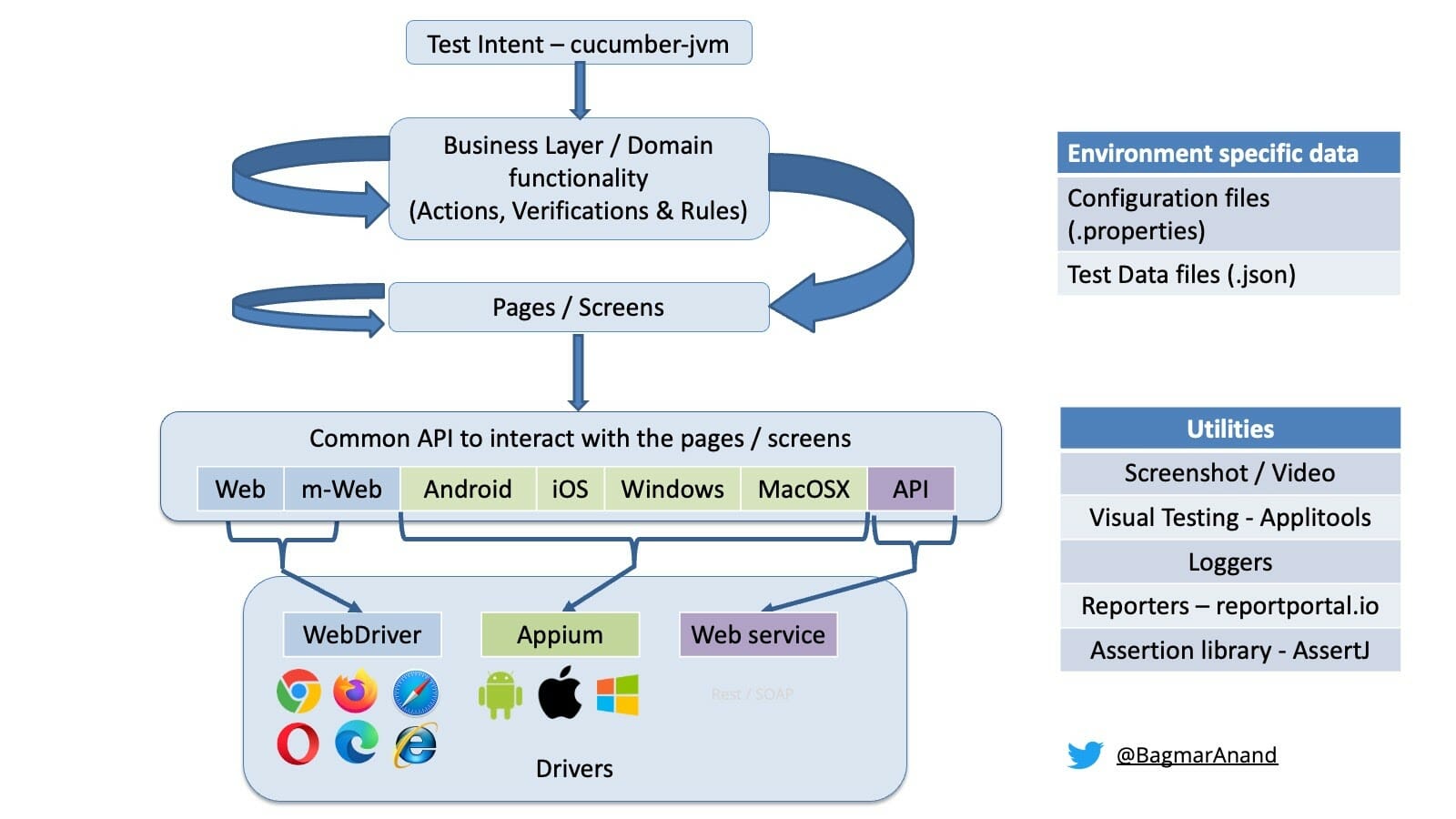
This is the high-level architecture of the teswiz framework.
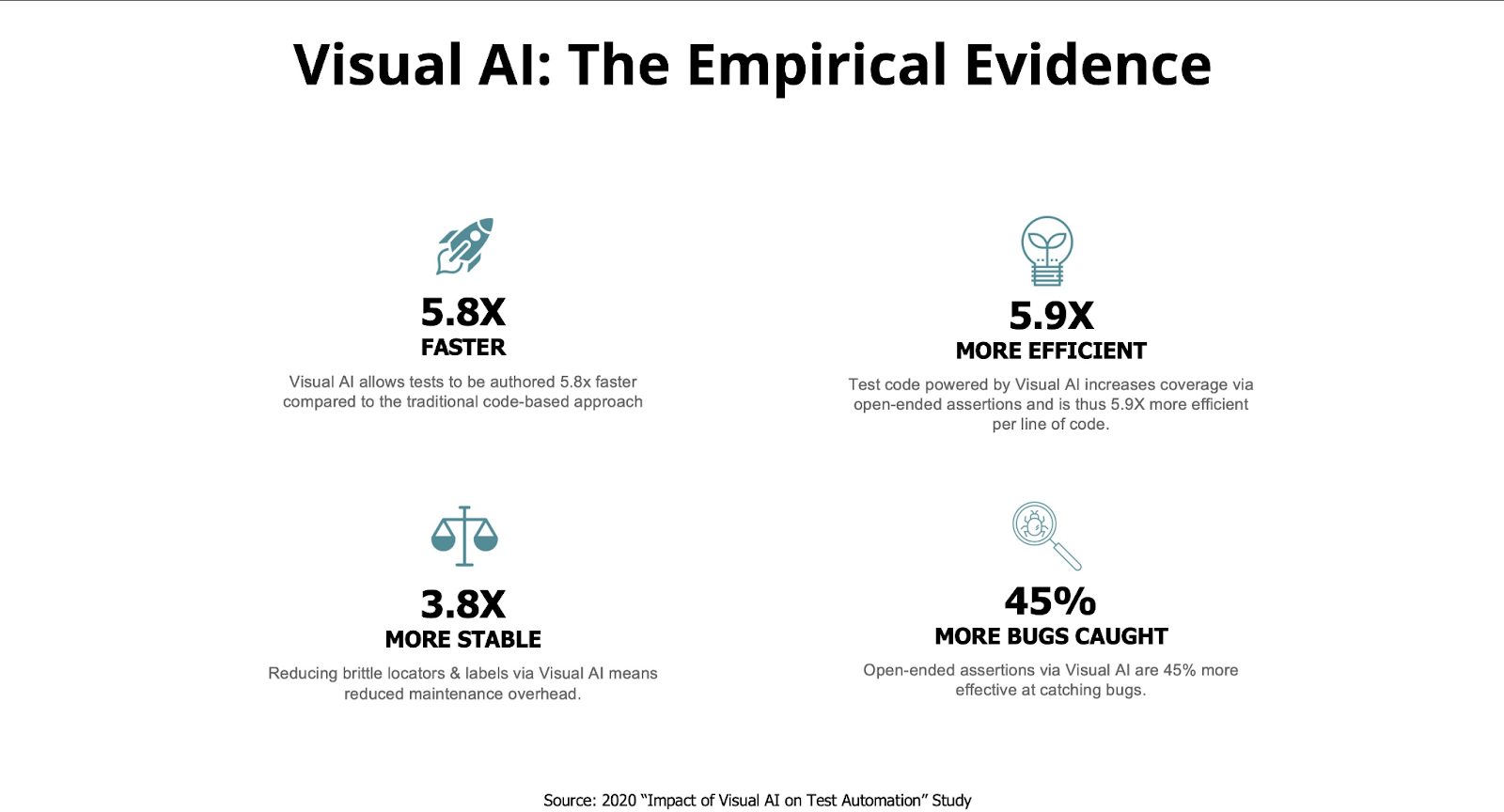
Based on the data from the study done on the “Impact of Visual AI on Test Automation,” Applitools Visual AI helps automate your Functional Tests faster, while making the execution more stable. Along with this, you will get increased test coverage and will be able to find significantly more functional and visual issues compared to the traditional approach.
You can also scale your Test Automation execution seamlessly with the Applitools UltraFast Test Cloud and use the Contrast Advisor capability to ensure the application-under-test meets the accessibility guidelines of the WCAG 2.0 / 2.1 standards very early in the development stage.
Read this blog post about “Visual Testing – Hype or Reality?” to see some real data of how you can reduce the effort, while increasing the test coverage from our implementation significantly by using Applitools Visual AI.
Hence it was a no-brainer to integrate Applitools Visual AI in the teswiz framework to support adding visual assertions to your implementation simply by providing the APPLITOOLS_API_KEY. Advanced configurations to override the defaults for Applitools can be done via the applitools_config.json file.
This integration works for all the supported browsers of WebDriver and all platforms supported by Appium.
It is very important to have good and rich reports of your test execution. These reports not only make it valuable to pinpoint the reasons of the failing test, but also should be able to give an understanding of the trend of execution and quality of the product under test.
I have used ReportPortal.io as my reporting tool – it is extremely easy to set up and use and allows me to also add screenshots, log files and other information that may seem important along with the test execution to make root cause analysis easy.
I have open-sourced this teswiz framework so you do not need to reinvent the wheel. See this page to get started – https://github.com/znsio/teswiz#what-is-this-repository-about
Feel free to raise issues / PRs against the project for adding more capabilities that will benefit all.