Stop the Retries in Tests & Reruns of Failing Tests
November 17, 2020
|
Anand Bagmar
On this page
Have you heard of “flaky tests”?
There are a lot of articles, blog posts, podcasts, conference talks about what are “Flaky tests” and how to avoid them.
Before we look at techniques to resolve flaky tests, let’s understand the typical reasons why tests are flaky / intermittent.
Reasons for flakiness in tests
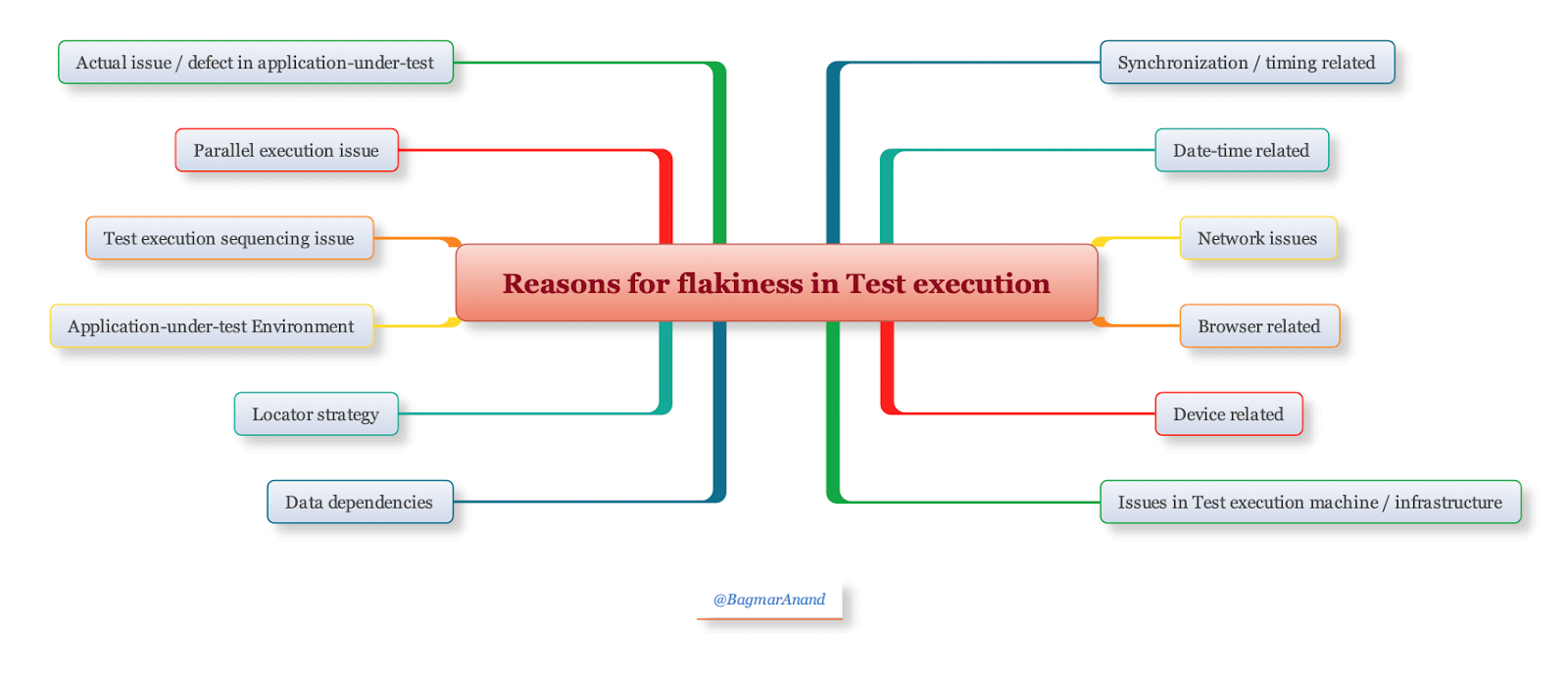
There are many reasons why tests can be flaky / intermittent.
Let’s take a look at some concrete examples of why tests can be flaky in each of the above mentioned areas:
Synchronization / timing related issues
Examples:
page loading taking time because of front-end processing,
asynchronous processing,
load on backend APIs / server resulting in delayed response,
not using correct “wait” strategies in the test implementation,
loading frames / heavy elements / content, etc.
Date / Time related
Examples:
incorrect time calculations based on time-zones, midnight
incorrect date calculations based on months / years
using incorrect date-time format / timezones as required by each specific service call
Network issues
Examples:
drops in packets in the network,
unstable network connectivity,
network heavily loaded resulting in slow connection speed,
inconsistent product behaviour when simulating slow network conditions (ex: 2G speeds) , etc.
Browser related issues
Examples:
each browser behaves differently and uses different resources.
the plugins / extensions installed in the browser may add to fluctuations in speed of rendering, memory usage, etc.
different locator identification strategy required based on the browser and its viewport size.
Device related issues
Examples:
the device hardware specs can contribute to the device performance, and hence can impact the executing test as well
Data dependencies
Dynamic data, changes in availability or validity of available data (because of other colleagues / tests using it / changing it / consuming it)
Caching strategy may be incorrect
Incorrect state of the application-under-test when test starts running
Locator strategy
Examples:
weird & hard-wired xPaths / locators which changes due to data / small (unrelated) changes in the UI
Locators change based on responsive rendering of the application-under-test
Application-under-test Environment issue
Examples:
Unstable components, on-going deployments of components
Instability of integrated 3-party components / systems in the environment
Other ongoing use of the environment (maybe other types of tests, performance testing, etc.) can call the environment to slow down, hence impacting test execution
Test execution machine issue
Examples:
Other processes / applications / browser sessions running in parallel / background will end up competing and sharing of device / browser resources – hence impacting the test execution
Limitations of the machine where the test is running (processing speed, memory, etc.)
Inconsistent / incorrect version of software required to execute the tests causes tests to fail on certain set of machines
Test execution sequencing issue – Does the test fail intermittently when the sequence changes?
Examples:
Tests are dependent on other tests (for setting up the data / state of the application-under-test)
Parallel execution issue
Examples:
tests fail intermittently when run in parallel
Actual issue / defects in the application-under-test
Example:
load on the application
race conditions
Intermittent connectivity to other systems / services / DBs
Antipatterns – Approach (many) teams use to handle test flakiness!
Antipattern #1: Rerun the failing test automatically
Retry once and pray that the test passes
Retry twice and pray some more
Retry thrice and pray a whole lot more
……
If the team is lucky, the test passes, and they report it accordingly – i.e. push the dirt under the carpet and claim all is clean and good.
I however feel that the team is unlucky in this case – as they have missed an opportunity to find, report and get the fix implemented at the right place, at the right time!
Do you think that is a good approach?
I definitely do not agree with this approach – it is not going to help anybody.
Antipattern #2: Intelligent retries in tests
There are tools / solutions having interesting features which will allow either automatic retry, or, can be configured to automatically retry) certain operations in the test to handle intermittent failures. These operations could be for retry click, checking for visibility of elements, or maybe some network API calls, etc.
However this approach is also not right in my opinion.
What if the retry succeeds, but the 1st time it failed because of a performance issue, or some other issue? If your test encountered this issue, what is the likelihood of the end-user also facing the similar issue? Will they do a retry? Think about this. In fact, all aspects of testing should be thinking about what will the end-user do with your product, and how will they react to / handle situations when their interactions with the application-under-test gives an unexpected behaviour.
Unfortunately the tools I am referring to are highlighting this as a great new feature – which is going to promote more poor / bad practices IMHO.
What’s next?
Stop the band-aid approach to fix the symptom, i.e. fixing a failing test. Focus on identifying the root cause and then fix that in the correct approach.
How to find the reasons for intermittent / flaky tests?
Unfortunately, there is no straight answer for this question. The key is to try and find a pattern when the intermittent failure happens, and then dig deep into the RCA for the same. Many times, the reason could be a poor test implementation itself. Once you rule that out, the reason could be a bug / defect in the application-under-test which is exposed in specific cases, data related issues, or an environment / network issue.
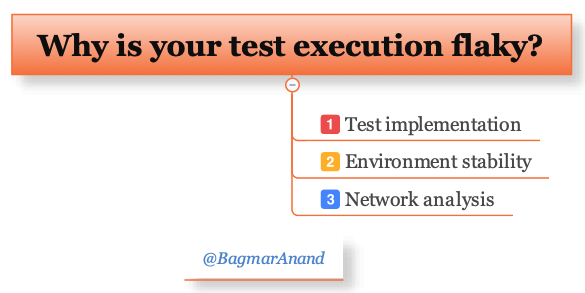
I follow various techniques to try and understand the reason for tests to be flaky. They are:
Test implementation
Does the test execute consistently (as per expectation) only in a specific sequence?
Does the test fail intermittently if run out of sequence, or in parallel with other tests?
Does the test fail intermittently on specific browser(s) / device(s)?
Does the test fail intermittently in specific environments?
Is test data changing / invalid?
Is the intermittent failure related to timing / wait conditions
Environment / Application-under-test stability
Is there any deployment / maintenance activity happening when the test fails?
Any specific trend of timing when the failures appear more often
Any unusual load on the environment when the tests fail?
Any abnormal stats from the server resource usage?
Network analysis
Work with the network team to identify
if there were any glitches in the network connectivity when the test failure occurred
what was the load on the network when the test failure occurred
Since you may not be able to replicate the failures very easily, to help in such investigations it is critical to have extensive logging enabled and available.
Tips & Techniques to reduce flakiness in tests
Now that you have taken the steps to do proper investigation and RCA to find the reason for the intermittent failures, look at the context of your application, team skills, infrastructure, etc. to come up with the “right” solution to fix the problem at the source.
The worst thing you can do as a fix is to blindly increase the wait time or rerun the test to hope it passes. DO NOT DO THAT!!
The “right” approach to fix a flaky test could mean any or multiple of the following, and more –
Architecture review and change
Infrastructure setup and management
Configurations for services / databases / hardware
Practices to enable quick feedback
Processes to foster collaboration
Monitoring & observability to understand environment and status of deployed systems in real-time
Intelligent service virtualisation for external systems in lower environments to give you more control, predictability and ability for testing positive, negative and edge case scenarios & workflows w.r.t. external systems
Logging – In order to prevent / reduce having to rerun a test with the hope of reproducing the intermittent issue, having extensive logging enabled by default is crucial.
Logs of the following various forms and types are valuable, hence required:
Test execution logs
Network logs – i.e. capture of network traffic as part of functional tests to understand any drop / issue in specific network calls. Ex: HAR (HTTP archive format) capture can give you a lot of insights
Device logs (if applicable)
Screenshots, if video recording of the failed test is not available)
Corresponding application logs
System health logs – i.e. Server-side memory / cpu usage and response times
In many cases, the above investigation needs to be a collaborative effort between various roles, as any one role may not have the full context of the whole system.
Takeaways
Recognise reasons why tests could be flaky / intermittent
Critique band-aid approach to fixing flakiness in tests
Discuss techniques to identify reasons for test flakiness
Fix the root-cause, not the symptoms to make your tests stable, robust and scalable!