
As a product manager at Applitools I am excited to announce an enriched and updated integration with Testim.io! This enhanced integration makes it easier for testers of any technical ability to use Applitools and our AI-powered visual testing platform by using Testim.io to easily create your test scripts.
Testim.io is a cloud platform that allows users to create, execute, and maintain automated tests without using code.
It is a perfect tool for getting started with your first automated tests, if you do not have an existing automated testing framework or if you have not started to run tests yet. Testim.io allows you to integrate your own custom code into their steps so you can implement custom validations if you need to.
The visual validation empowered by Applitools Eyes allows you to compare the visual differences between expected results (baseline) with actual results after creating the tests in Testim.io. By using Visual AI to compare snapshots Applitools Eyes can spot any unexpected changes and highlight them visually. This lets you expand your test coverage to include everything on a given page as well as visually verify your results quickly.
As part of the integration, you can modify test parameters to customize Eyes while working with the Testim UI.
This AI-based visual validation functionality is provided by Applitools and requires simple integration setup in the Eyes application. Learn more.
This up-to-date integration provides access to Applitools’ latest and greatest capabilities, including Ultrafast Test Cloud, enabling ultrafast cross-browser and cross-platform functional and visual testing. Testim users also now have access to Root Cause Analysis and many more powerful Applitools features!
The new integration also greatly improves on the user experience of test creators adding Applitools Eyes checkpoints to their Testim.io tests. Visual validations can be added right inside Testim and the maintenance and analysis of test results is much simpler.
You can perform the following visual validations:
Whether you select the element, viewport, or full-page visualization option you can always override the visual setting for that test or step.
The following Applitools Eyes settings can be accessed via the Testim.io UI:
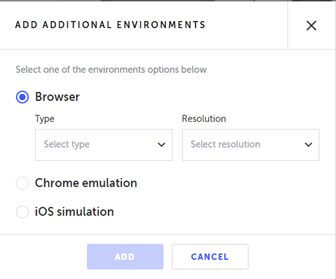
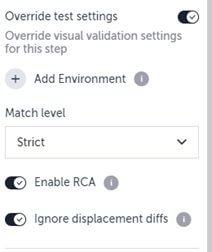
In addition to exposing new features in the Testim UI, we have provided better visibility to Testim tests in Applitools Eyes:
Testim.io allows users to quickly create and maintain tests through record and playback. Adding Applitools visual testing with Ultrafast Test Cloud capabilities will make sure your release cycles are short and test analysis and maintenance are easier than ever!
If you want to learn more about how you can integrate your codeless Testim tests with Applitools and benefit from the latest Applitools capabilities, head over to Testim.io documentation.
Contact us if you have any queries about Applitools!
Happy testing!