TL;DR
To automate Applitools baseline branch merging within CI/CD pipelines, use a Shared Library to call the Applitools Eyes Server API. This eliminates manual baseline maintenance in the Eyes Dashboard, ensures visual consistency across Git branches, and establishes automated gatekeeping. Best practices dictate running verification (
onlyCheck: true) during Pull Requests and executing actual merges (onlyCheck: false) post-merge in CD pipelines to avoid blocking active runner threads.
What are Applitools Baseline Branches, and why automate them?
Applitools natively supports branching and merging to match your software development lifecycle, integrating out of the box with platform hosts like GitHub and Bitbucket. However, larger engineering organizations often find themselves in more complex scenarios: they may rely on custom CI/CD orchestration decoupled from source control, or use specialized on-premise infrastructure not covered by native webhooks.
When native integration isn’t an option, teams are faced with a choice: fall back on manual branch management within the Eyes dashboard, or write custom orchestration scripts. While manual management works for a handful of developers, it introduces unnecessary toil and human error at enterprise scale, risking fragmented baselines before production deployments.
Moving this logic into your CI/CD pipeline scales your visual testing strategy sustainably. To keep this guide concrete, we will focus on implementing this within the Jenkins CI ecosystem (including CloudBees CI). While the underlying scripting uses Jenkins-specific patterns, the core API design patterns and risk-mitigation strategies are fully portable to GitHub Actions, GitLab CI, or CircleCI.The following architecture utilizes sample code from this GitHub repository, developed to solve this specific workflow for enterprise customers and open-sourced for the broader Applitools community. This code directly interfaces with the Applitools Eyes Server API for merging branches.
Requirements for Baseline Branch Management
To ensure this pipeline addition runs predictably without causing platform drift or broken builds, you must coordinate with your infrastructure team to satisfy a few baseline environment requirements:
- Secured Team API Key: You will need an Applitools API key scoped appropriately for your team. This must be managed as a first-class credential within Jenkins (e.g., via the Credentials Binding plugin) so it remains encrypted and masked in all build logs.
- Agent-Level Tooling (
curlandjq): The underlying script utilizescurlfor robust API communication andjqfor efficient JSON parsing. Usingjqon the executor is a deliberate performance choice, as native GroovyJsonSlurperexecution is a known performance anti-pattern that can destabilize Jenkins controllers. Ensure your Jenkins agent images or Kubernetes execution pods have these packages installed. - Shared Library Access: This solution is implemented as a Jenkins Global Shared Library to promote global reusability and prevent pipeline script duplication across your organization.
Encapsulating risk via Shared Libraries
In a complex Jenkins environment, a Shared Library acts as a managed, reusable code repository injected into your pipelines at runtime. This provides a clear security advantage over unmanaged plugins: it executes entirely within the individual pipeline sandbox, preserving cluster-level security controls while offering a fully auditable path for shared code.
From an operational standpoint, the true value of the Shared Library approach is that it wraps asynchronous Applitools API interactions behind a single, abstracted function call. The library internally handles the complex realities of production networking—managing initial HTTP POST requests, handling continuous polling cycles, and executing graceful failure checks—preventing hundreds of lines of brittle boilerplate code from cluttering your standard application pipelines.
Integrating the Pipeline Step Safely
By abstracting the integration into a Shared Library, developers can invoke a single command with minimal parameters. This turns what would otherwise be a complex orchestration task into a predictable, guard-railed deployment step:
@Library('applitools-shared-library') _

stage('Merge Applitools Baselines') {
    steps {
        script {
            def result = applitoolsMergeBranches(
                apiKey:           env.APPLITOOLS_API_KEY,  // from credentials binding
                sourceBranch:     'myorg/my-repo/feature-branch',
                targetBranch:     'myorg/my-repo/main',
                onlyCheck:        false,          // set true to check for conflicts without merging
                timeoutSecs:      300,            // how long to wait for the job (default: 300)
                pollIntervalSecs: 10,             // how often to poll for status (default: 10)
                eyesServerUrl:    'https://eyes.applitools.com'  // only needed for private cloud
            )

            echo "merged=${result.merged}, conflicts=${result.conflicts}"
        }
    }
}Note: it might be worthwhile to set the eyesServerUrl to a global environment variable or hardcode it in the Shared Library since this typically doesn’t change.
This can be reduced even further by using defaults and only ensuring provision of an API key, source branch, and target branch. This code validates that there are no outstanding conflicts (unresolved changes) and confirms that the branches can be successfully merged before triggering the merge. There is also a dry run option, called onlyCheck; if set to true, it will check if there are conflicts or not without doing any merging. This is great for pre-merge checks or pull request status gates before the code is merged from one branch to another.
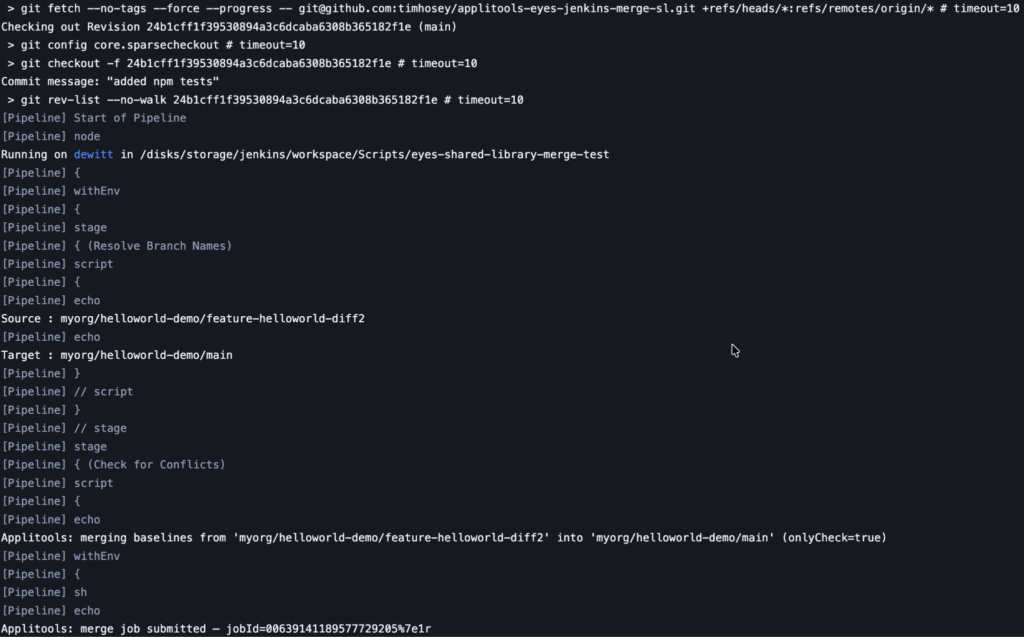
Merges automatically fail if:
- Required parameters are missing
- The API returns a non-202 status on the initial merge request
- The branch is not found (HTTP 404)
- The job does not complete within
timeoutSecs
These can be caught in a try/catch block to ensure you’re appropriately failing the pipeline if something goes wrong (for notifications or other actions in a post { fail {} } block, for example).
Considerations for Your Pipeline
Because this function utilizes a synchronous polling mechanism to confirm the status of the baseline merge, it will temporarily hold a Jenkins executor slot until completion or timeout. To protect your team’s concurrent build capacity and minimize costs, follow these operational best practices:
- Strategic Pipeline Placement: Avoid running full merge automation on every noisy feature-branch commit. Instead, place the
onlyCheck: trueverification step on your Pull Request validation pipelines, and restrictonlyCheck: false(the actual merge) to your post-merge CD pipelines or nightly release trains. - The
onlyCheckSafety Valve: TheonlyCheckparameter acts as a perfect pre-flight check. Setting it totrueallows the pipeline to query Applitools for visual conflicts without modifying any actual data. This lets you block a broken pull request early without polluting your baseline history.
Defensive Error Handling: The step is engineered to automatically fail if parameters are missing, the server returns an unexpected HTTP code, or the task exceeds timeoutSecs. Wrap this execution block in a standard Groovy try/catch to gracefully catch failures and alert your team via Slack or PagerDuty without abruptly crashing adjacent infrastructure steps.
Operational Takeaways
Moving your visual baseline management out of manual workflows and into a structured CI pipeline replaces human error with auditability, predictability, and speed.
By leveraging a Jenkins Shared Library, you provide engineering teams of any skill level with a safe, standardized entry point into automated visual testing. You can explore the open-source repository and review the script logic here.
Remember that this API pattern isn’t constrained to Jenkins; the underlying Applitools Server API logic can be easily dropped into GitHub Composite Actions or GitLab CI templates using identical execution parameters.
While AI and agentic automation continue to accelerate development speed, enterprise quality assurance still requires workflows that are auditable, stable, and transparent. Automating your visual baselines protects consistency, minimizes maintenance overhead, and ensures that your automated quality gates can handle complex delivery cycles reliably.
Quick Answers
SCM-based branching (e.g., Git) tracks changes to your source code. Applitools baseline branching tracks changes to the visual assertions (screenshots) used to validate that code. Automating baseline merges aligns your visual test baselines with the state of your production branch.
Yes. If your Jenkins agents run within dynamic Docker environments, ensure that curl and jq are packaged inside your agent’s base Docker image to satisfy host requirements.
If the same visual checkpoint is updated differently in both the feature branch and the main branch, a conflict occurs. Your pipeline will report a conflict status. You must resolve these conflicts inside the Applitools Eyes Dashboard before the automated merge can succeed.
Absolutely. While the implementation shown uses Jenkins syntax, the logic is highly portable. You can configure a custom GitHub Composite Action or GitLab CI YAML template using the same shell execution parameters (curl, jq) pointing to the Applitools baseline merge endpoints.