Maintain Design Integrity with Visual AI Testing
Applitools bridges design and code with automated visual validation that catches drift before it ships.
Compare design-to-code or design-to-design across every screen, browser, and build. Validate designs against live code with Applitools Visual AI, all in one shared workspace.
Eliminate Tedious Manual Work
Forget pixel hunts. Applitools automates visual QA—capturing states, flagging differences, and approving updates in one click. Visual AI shows what changed, turning hours of review into seconds so designers and devs stay focused on creating, not checking.
Sync Design and Implementation
Applitools bridges design and development with its Figma Plugin and Storybook integration.
Designers set visual baselines from Figma, developers validate code against them, and visual drift is caught instantly—no more “this looks off” moments.
Preserve Consistency Across Components
As design systems evolve, Applitools keeps components aligned. The Storybook addon visually tests and auto-groups components for contextual review, preserving consistency across screens and browsers—no manual triage required.
Start testing your component system
with Applitools and Visual AI


We use Applitools extensively in our regression testing at Branch. The Visual AI is incredibly accurate, but equally impressive are the AI powered maintenance features. With the volume of tests that we run, the time savings that the AI auto-maintenance features afford us are extensive.Joe Emison • Branch FinancialCTO
Validate Every Design Decision
Detect Visual Drift, Not Just Pixel Changes
Applitools Visual AI sees beyond screenshots to understand layout, color, and spacing the way your users do.
Unlike traditional diff tools, it catches true visual regressions and ignores irrelevant noise — so teams spend less time chasing false positives and more time designing.
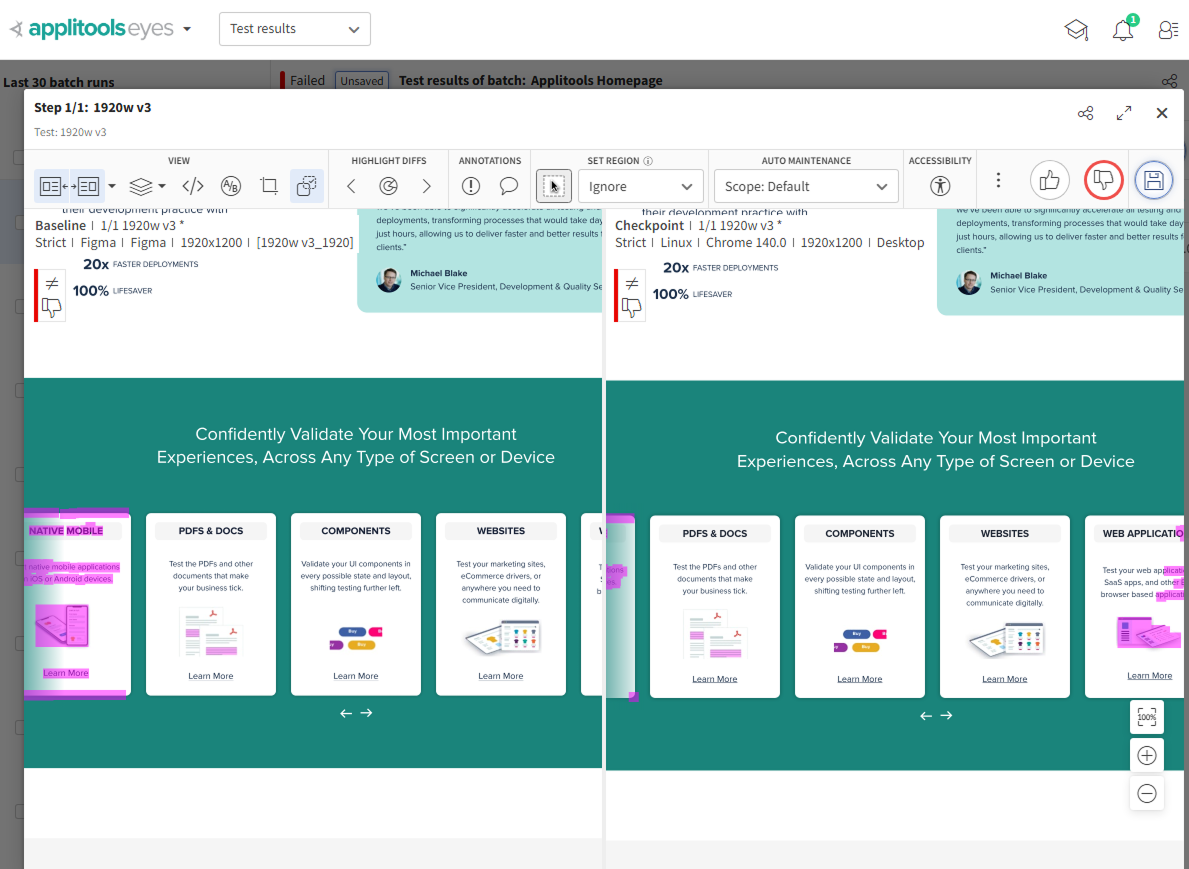
Keep Design and Code Perfectly in Sync
With the Applitools Figma Plugin, your designs become the single source of visual truth.
Export frames directly to Applitools Eyes, where front-end developers automatically validate implementation against the original intent. No more “this looks off” in review.
Power Collaboration Across the Entire Product Team
Designers, developers, and QA now share one visual workflow.
Review changes, approve updates, and protect component consistency — across Storybook, staging, and production — with automation that scales. Applitools connects your tools, your team, and your design system in one seamless platform.
Why Design Teams Love Applitools

AI-Powered Visual Testing
Most tools compare pixels — Applitools understands design. Visual AI spots real layout, color, and typography changes while ignoring noise, delivering faster, trusted reviews.

Native Storybook Addon
Run, view, and manage visual tests directly inside the Storybook interface using the built-in Applitools Eyes tab and reporter widget.

Automatic Component Grouping
Test results are automatically grouped by component to mirror your Storybook structure, simplifying triage and review.

Automated Maintenance
Automatically approve or reject similar diffs in bulk, speeding up test review and reducing maintenance overhead.

Bring Design and Dev Together
Applitools unites design, dev, and QA in one visual workspace. Review, comment, and approve together—no handoffs, no context switching.

Enterprise-Grade Security and Compliance
Use Eyes with secure environments through dedicated or on-prem deployment, ideal for financial, healthcare, and government sectors.
Frequently Asked Questions
Figma design testing with Applitools lets designers automatically validate that their Figma designs match what’s built in code. Using the Applitools Figma Plugin, you can export design frames to create visual baselines, compare design versions, and detect visual drift between design and production — all powered by Applitools Visual AI.
The Storybook Addon for Applitools Eyes brings automated visual testing directly into the development workflow. Developers can run visual checks on components inside Storybook, review diffs, and approve changes in context — without waiting for CI. This keeps design systems consistent and prevents visual regressions before code is merged.
Applitools is powered by deterministic Visual AI trained on hundreds of millions of images. Unlike pixel-based tools, it understands visual intent — detecting only meaningful UI changes in layout, color, or content. This reduces false positives and ensures reliable visual validation across design, code, and production environments.
Yes. Applitools bridges design and development workflows through its Figma Plugin and Storybook Addon. Designers validate visual intent early in Figma, while developers confirm accuracy in Storybook or CI. Both teams review results in the same Eyes dashboard, creating a single visual source of truth for quality and consistency.