Give Your Optimizely Devs (and Agents) Visual Guardrails to Prevent Bugs. Save your spot for the Oct. 29th webinar

Give Your Optimizely Devs (and Agents) Visual Guardrails to Prevent Bugs. Save your spot for the Oct. 29th webinar
The visual aspect of a website or an app is the first thing that end users will encounter when using the application. For businesses to deliver the best possible user experience, having appealing and responsive websites is an absolutely necessity.
More than ever, customers expect apps and sites to be intuitive, fast, and visually flawless. The number of screens across applications, websites, and devices is growing faster, with the cost of testing rising high. Managing visual quality effectively is now becoming a MUST.
Visual testing is the automated process of comparing the visible output of an app or website against an expected baseline image.
In its most basic form, visual testing, sometimes referred to as Visual UI testing, Visual diff testing or Snapshot testing, compares differences in a website page or device screen by looking at pixel variations. In other words, testing a web or native mobile application by looking at the fully rendered pages and screens as they appear before customers.
While visual testing has been a popular solution for validating UIs, there have been many flaws in the traditional methods of getting it done. In the past, there have been two traditional methods of visual testing: DOM Diffs and Pixel Diffs. These methods have led to an enormous amount of false positives and lack of confidence from the teams that have adopted them.
Applitools Eyes, the only visual testing solution to use Visual AI, solves for all the shortcomings of visual testing – vastly improves test creation, execution, and maintenance.
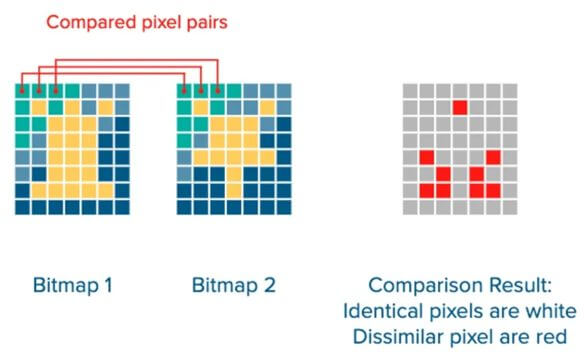
This refers to Pixel-by-pixel comparisons, in which the testing framework will flag literally any difference it sees between two images, regardless of whether the difference is visible to the human eye, or not.
While such comparisons provide an entry-level into visual testing, it tends to be flaky and can lead to a lot of false positives, which is time-consuming.
When working with the web, you must take into consideration that things tend to render slightly different between page loads and browser updates. If the browser renders the page off by 1 pixel due to a rendering change, your text cursor is showing, or an image renders differently, your release may be blocked due to these false positives.
Here are some examples of what this approach cannot handle:
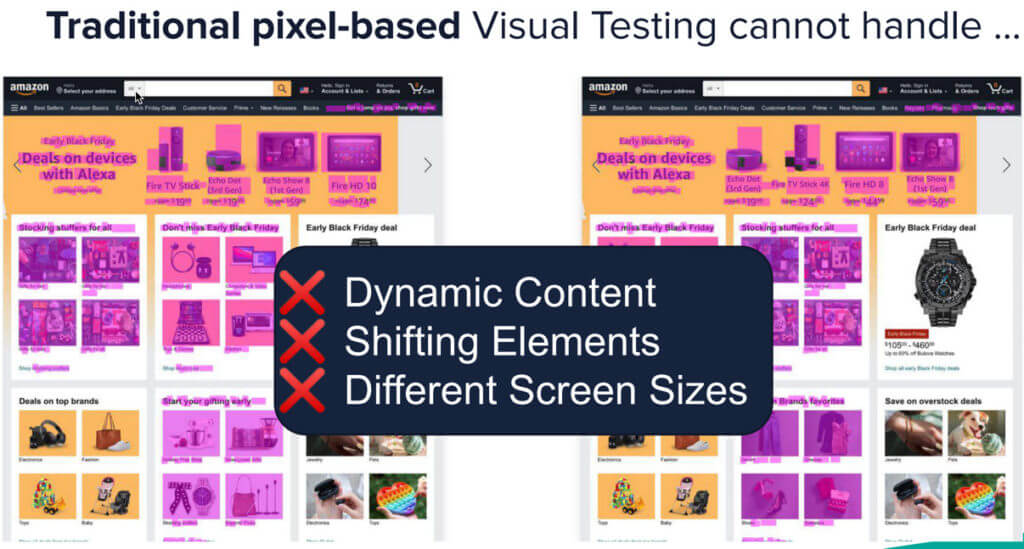
Pixel-based comparisons exhibit the following deficiencies:
Take for instance these two examples:


In this approach, the tool captures the DOM of the page and compares it with the DOM captured of a previous version of the page.
Comparing DOM snapshots does not mean the output in the browser is visually identical. Your browser renders the page from the HTML, CSS and JavaScript, which comprises the DOM. Identical DOM structures can have different visual outputs and different DOM outputs can render identically.
Some differences that a DOM diff misses:
DOM comparators exhibit three clear deficiencies:
In short, DOM diffing ensures that the page structure remains the same from page to page. DOM comparisons on their own are insufficient for ensuring visual integrity.
A combination of Pixel and DOM diffs can mitigate some of these limitations (e.g. identify DOM differences that render identically) but are still suspect to many false-positive results.
Modern approaches have incorporated artificial intelligence, known as Visual AI, to view as a human eye would and avoid false positives.
Visual AI is a form of computer vision invented by Applitools in 2013 to help quality engineers test and monitor today’s modern apps at the speed of CI/CD. It is a combination of hundreds of AI and ML algorithms that help identify when things go wrong in your UI that actually matter. Visual AI inspects every page, screen, viewport, and browser combination for both web and native mobile apps and reports back any regression it sees. Visual AI looks at applications the same way the human eye and brain do, but without tiring or making mistakes. It helps teams greatly reduce false positives that arise from small, inconceivable differences in regressions, which has been the biggest challenge for teams adopting visual testing
Visual AI overcomes the problems of pixel and DOM for visual validations, and has 99.9999% accuracy to be used in production functional testing. Visual AI captures the screen image, breaks it into visual elements using AI, compares the visual elements with an older screen image broken into visual elements (using AI), and identifies visible differences.
Each given page renders as a visual image composed of visual elements. Visual AI treats elements as they appear:
QA Engineers can’t reasonably test the hundreds of UI elements on every page of a given app, they are usually forced to test a subset of these elements, leading to a lot of production bugs due to lack of coverage.
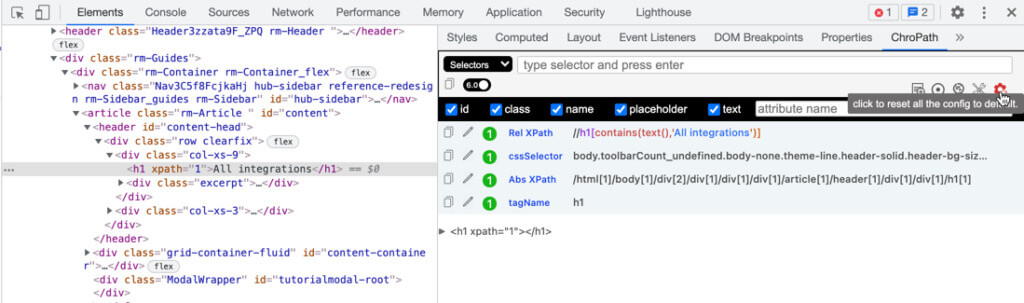
With Visual AI, you take a screenshot and validate the entire page. This limits the tester’s reliance on DOM locators, labels, and messages. Additionally, you can test all elements rather than having to pick and choose.
Visual AI identifies the layout at multiple levels – using thousands of data points between location and spacing. Within the layout, Visual AI identifies elements algorithmically. For any checkpoint image compared against a baseline, Visual AI identifies all the layout structures and all the visual elements and can test at different levels. Visual AI can swap between validating the snapshot from exact preciseness to focusing differences in the layout, as well as differences within the content contained within the layout.
Visual AI can intelligently test interfaces that have dynamic content like ads, news feeds, and more with the fidelity of the human eye. No more false positives due to a banner that constantly rotates or the newest sale pop-up your team is running.
Visual AI also understands the context of the browser and viewport for your UI so that it can accurately test across them at scale. Visual testing tools using traditional methods will get tripped up by the small, inconsistencies in browsers and your UIs elements. Visual AI understands them and can validate across hundreds of different browser combinations in minutes.
One of the unique and cool features of Applitools is the power of the automated maintenance capabilities that prevent the need to approve or reject the same change across different screens/devices. This significantly reduces the overhead involved with managing baselines from different browsers and device configurations.
When it comes to reviewing your test results, this is a major step towards saving team’s and testers time, as it will help to apply the same change on a large number of tests and will identify this same change for future tests as well. Reducing the amount of time required to accomplish these tasks translates to reducing the cost of the project.
ECommerce websites and applications are some of the best candidates for visual testing, as buyers are incredibly sensitive to poor UI/UX. But previously, eCommerce sites had too many moving parts to be practically tested by visual testing tools that use DOM Diffs or Pixel Diffs. Items that are constantly changing and going in and out of stock, sales that happening all the time, and the growth of personalization in digital commerce has made it impossible to validate with AI. Too many things get flagged on each change!
Using Visual AI, tests can omit entire sections of the UI from tripping up tests, validate only layouts, or dynamically assert changing data.
Dashboards can be incredibly difficult to test via traditional methods due to the large amount of customized data that can change in real-time.
Visual AI can help not only visually test around these dynamic regions of heavy data, but it can actually replace many of the repeated and customized assertions used on dashboards with a single line of code.
Let’s take the example of a simple bank dashboard below. 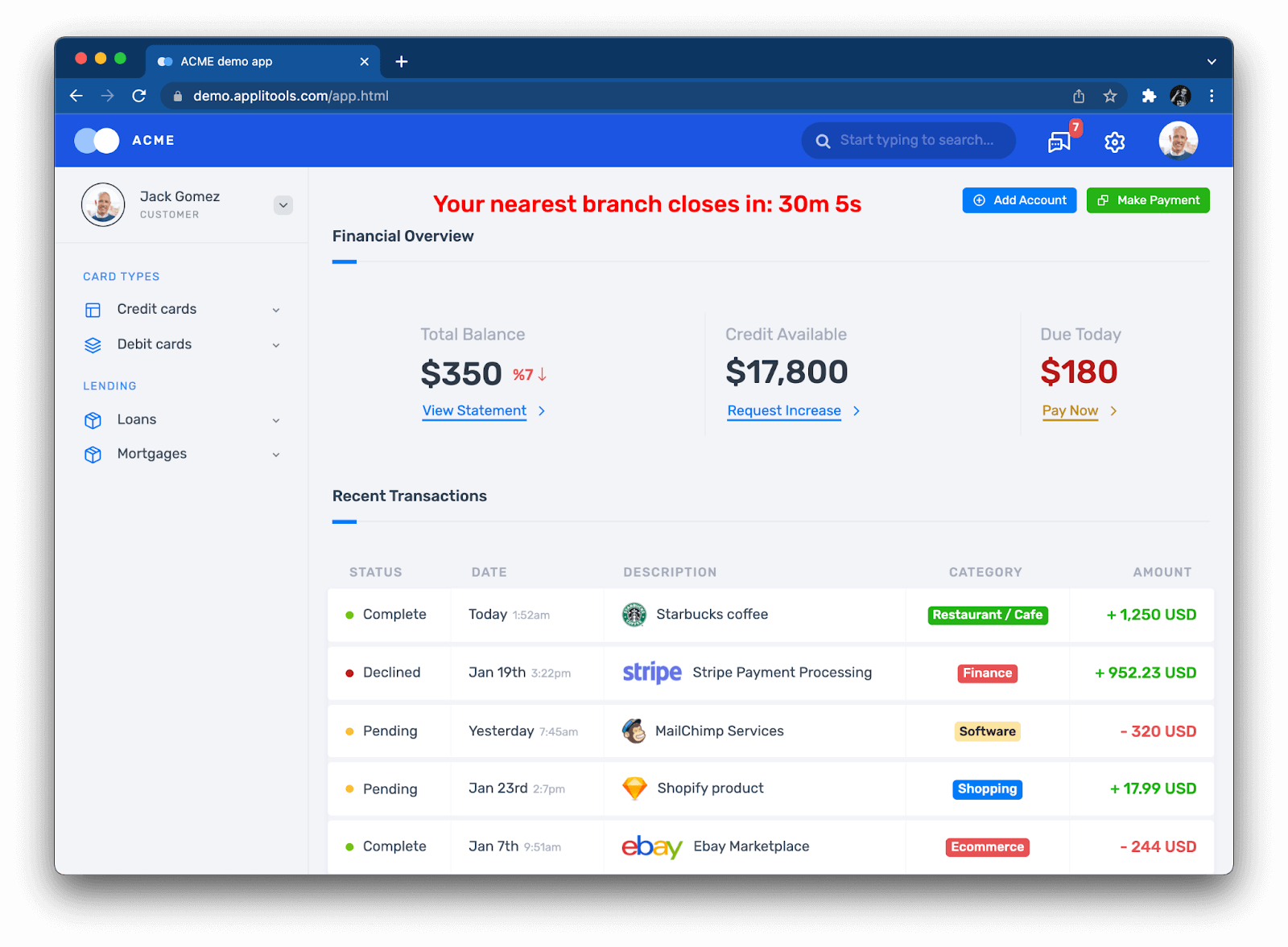
It has hundreds of different assertions, like the Name, Total Balance, Recent Transactions, Amount Due, and more. With visual AI, you can assign profiles to full-page screenshots meaning that the entire UI of “Jack Gomez’s” bank dashboard can be tested via a single assertion.
Design Systems are a common way to have design and development collaborate on building frontends in a fast, consistent manner. Design Systems output components, which are reusable pieces of UI, like a date-picker or a form entry, that can be mixed and matched together to build application screens and interfaces.
Visual AI can test these components across hundreds of different browsers and mobile devices in just seconds, making sure that they are visibly correct on any size screen.
PDFs are still a staple of many business and legal transactions between businesses of all sizes. Many PDFs get generated automatically and need to be manually tested for accuracy and correctness. Visual AI can scan through hundreds of pages of PDFs in just seconds making sure that they are pixel-perfect.
DOM-based tools don’t make visual evaluations. DOM-based tools identify DOM differences. These differences may or may not have visual implications. DOM-based tools result in false positives – differences that don’t matter but require human judgment to render a decision that the difference is unimportant. They also result in false negatives, which means they will pass something that is visually different.
Pixel-based tools don’t make evaluations, either. Pixel based tools highlight pixel differences. They are liable to report false positives due to pixel differences on a page. In some cases, all the pixels shift due to an enlarged element at the beginning – pixel technology cannot distinguish the elements as elements, this means pixel technology cannot see the forest from the trees.
Automated Visual Testing powered by Visual AI, can successfully work with the challenges of Digital Transformation and CI-CD by driving higher testing coverage while at the same time helping teams increase their release velocity and improve visual quality.
Be mindful when selecting the right tool for your team and/or project, and always take into consideration: